点击打印时,需要手动选择打印哪些内容。可选科室排名分析,严重程度分析,检查标准分析等tab项的内容。
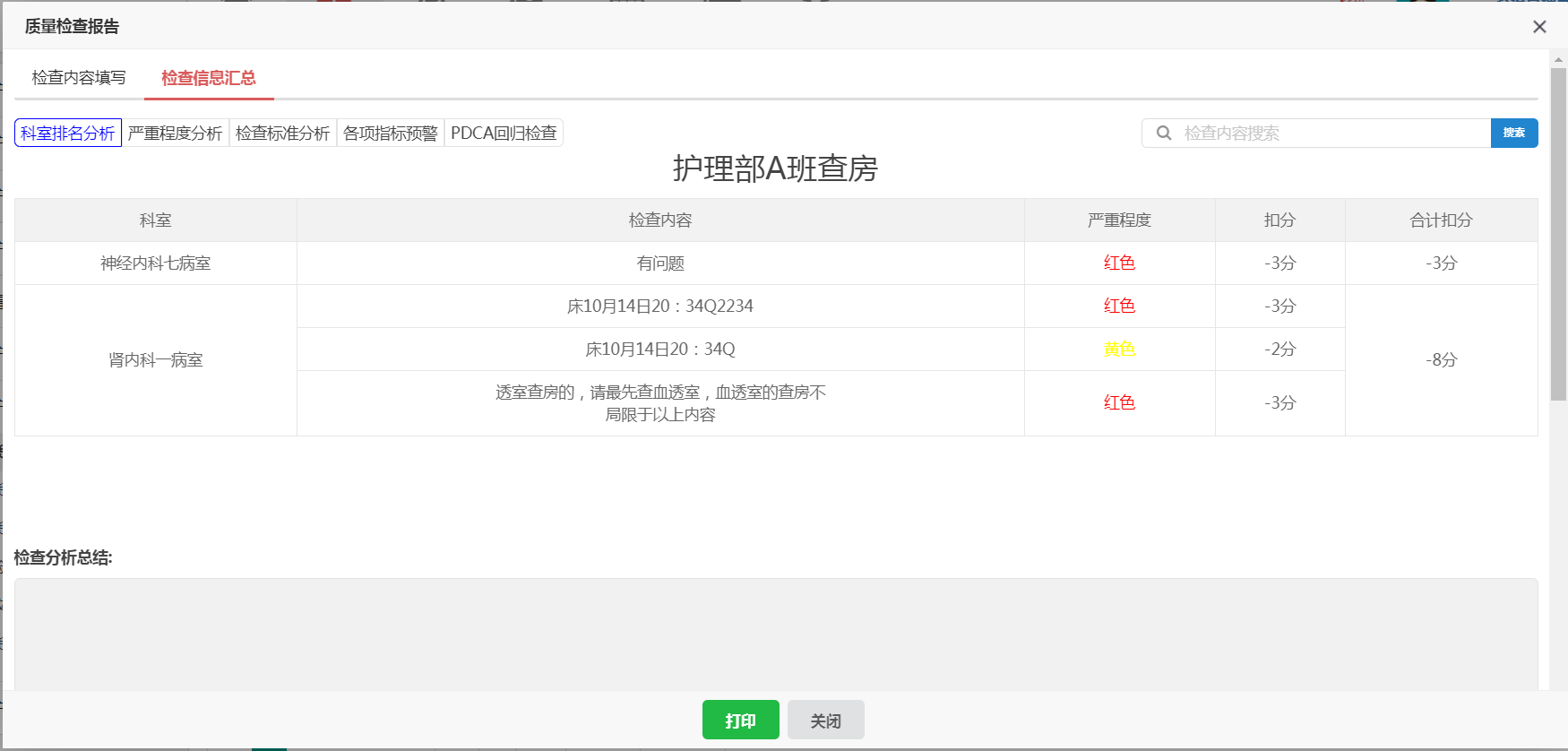
功能效果
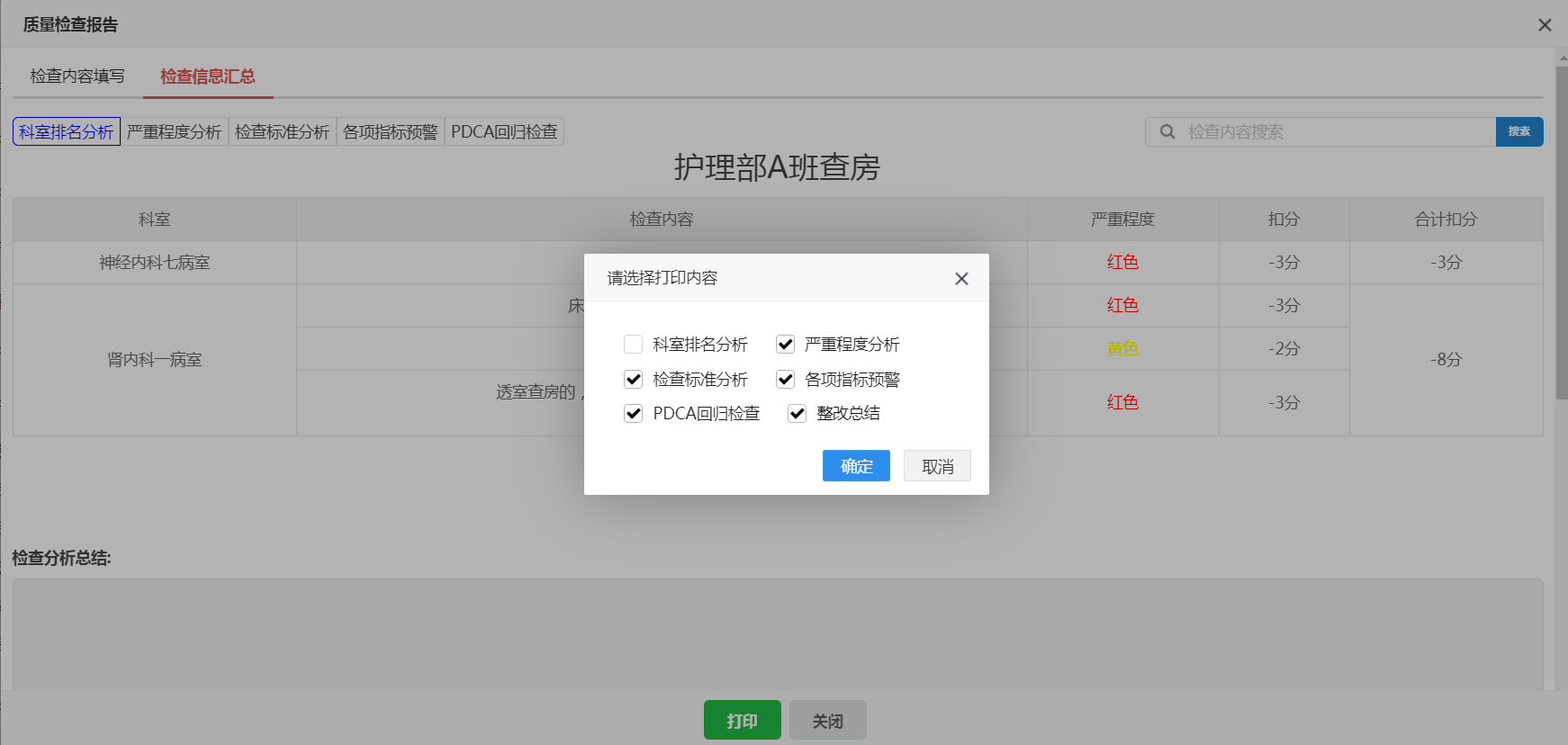
1、选择界面
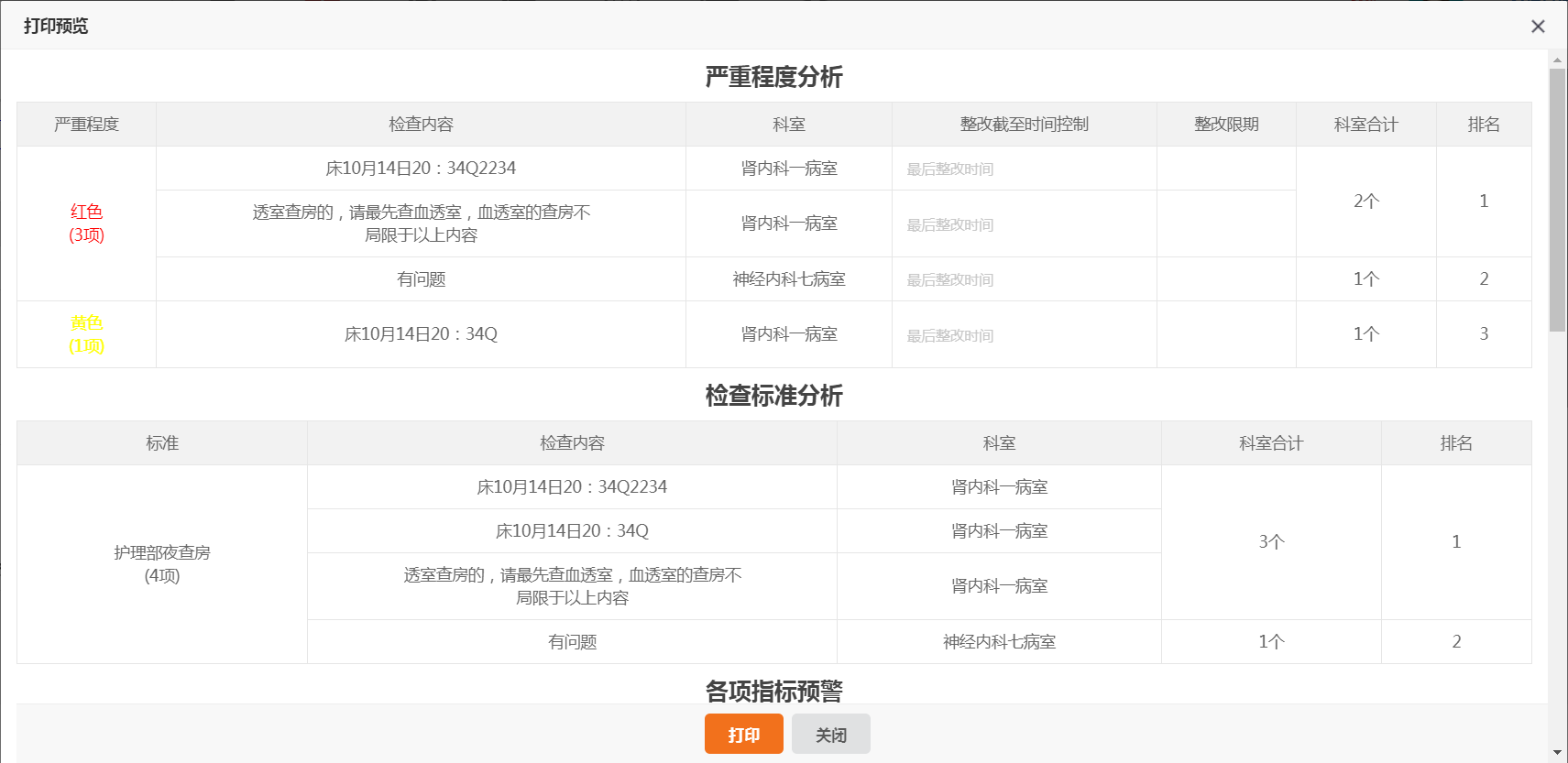
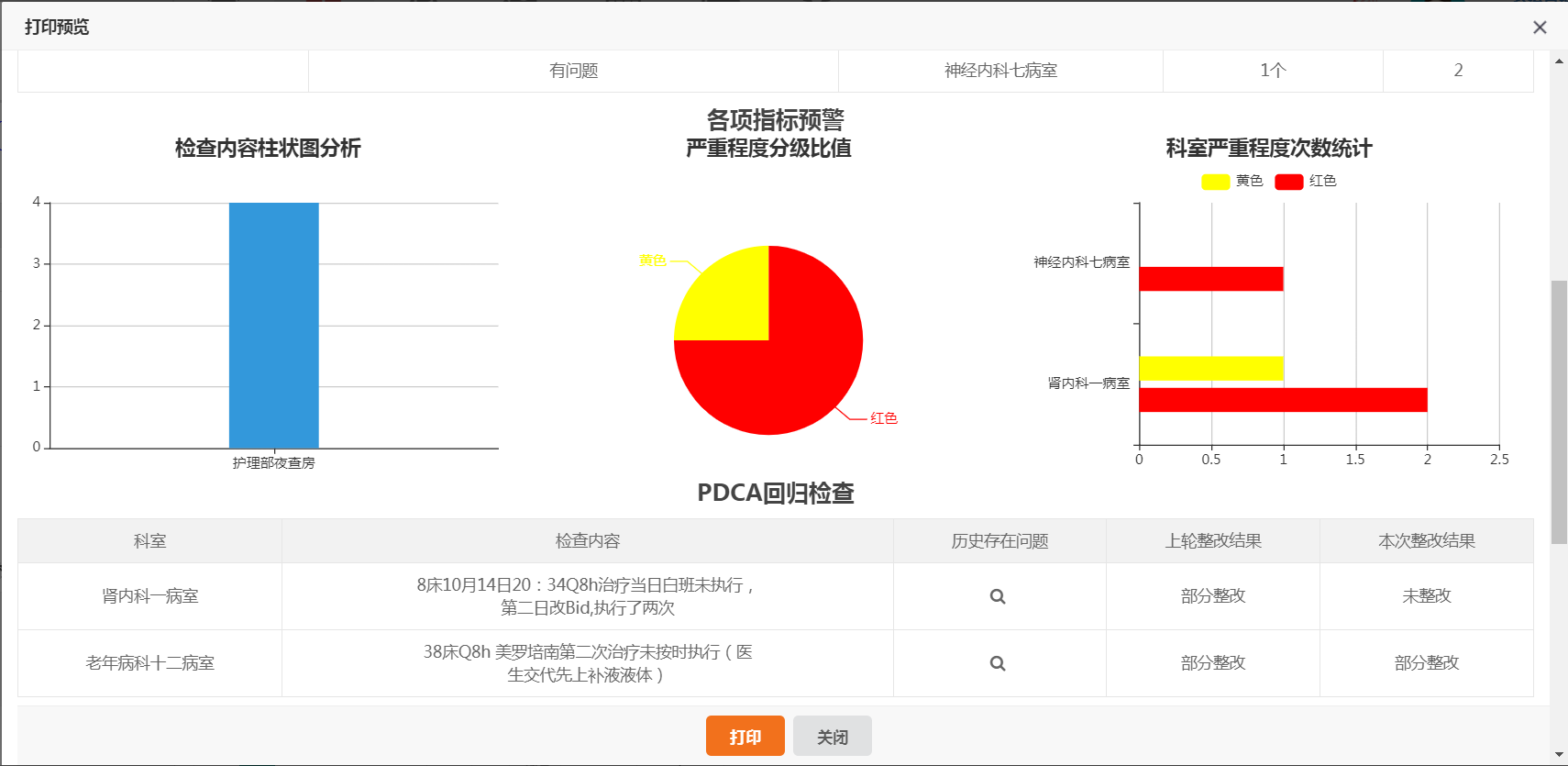
2、打印预览页面
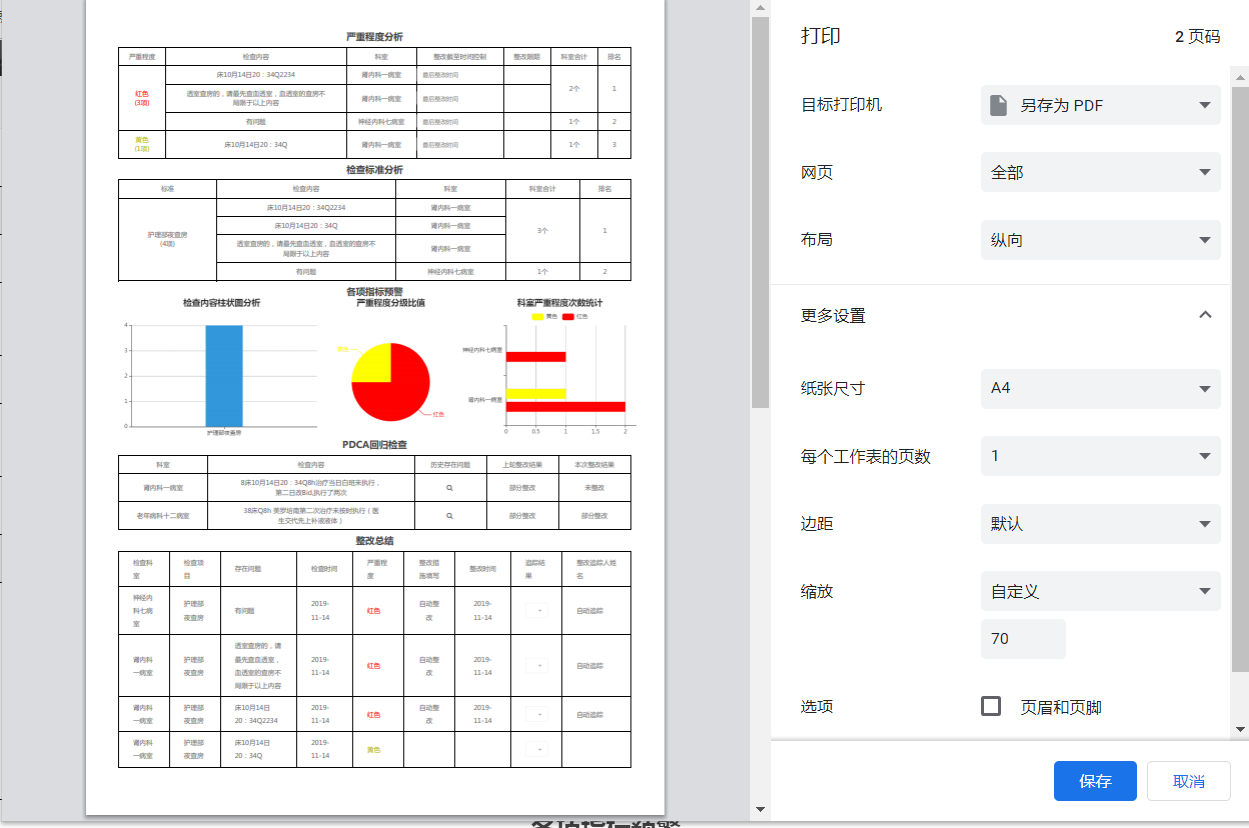
3、打印效果
实现思路:
1、点击打印时,获取全部可选项内容,弹窗提示选择需要打印的内容。
2、根据选择的内容id,获取对应部分的html代码,进行缓存。
3、确定时,弹出页面,展示打印预览页面效果。
4、点击打印,调用window.print()方法进行打印。
使用技术
1、layer弹窗框架
2、jquery
3、semantic ui(复选框组件)
实现步骤:
1、获取显示的tab的span元素,获取id和name值,生成标题和html内容。
2、直接使用layer.confirm 动态生成的复选框列表,并在回调函数中初始化组件。
3、点击确定的时候,动态获取tab页面中的内容,并组装printHtml。
4、由于需要使用window.print() 最好是新开一个页面。所以使用layer.open方式 新开页面,并使用sessionStorage缓存传递参数。
$("#printBtn").click(function(){
			//生成列表选项卡
			var htmlContent='<div class=" ui form mini">';
			htmlContent+=		'<div class="field">';
			$("#analysisTitle span:visible").each(function(){
				htmlContent+=			'<div class="ui checkbox" name="optionContent" style="margin-top:10px;margin-left:15px;">';
				htmlContent+=				'<input type="checkbox" name="optionContentInput" tabindex="0" value="'+$(this).attr("id")+'" class="hidden">';
				htmlContent+=				'<label>'+$(this).html()+'</label>';
				htmlContent+=			'</div>';
			});
			htmlContent+=			'<div class="ui checkbox" name="optionContent" style="margin-top:10px;margin-left:15px;">';
			htmlContent+='				 <input type="checkbox" name="optionContentInput" tabindex="0" value="zgzj" class="hidden">';
			htmlContent+=				'<label>整改总结</label>';
			htmlContent+=			'</div>';
			htmlContent+=		'</div>';
			htmlContent+='</div>';
			var gxzbyjFlag=0;
			parent.layer.confirm(htmlContent, {
				  title:'请选择打印内容',
				  btn: ['确定','取消'], //按钮
				  success: function(layero, index){
					$(".ui.checkbox",window.parent.document).checkbox();
				  }
				}, function(){
					var printHtml="";
					$("div[name='optionContent'].checked",window.parent.document).each(function(){
						var checkId=$(this).find("input").val();
						//科室排名分析
						if("kslp"==checkId){
							printHtml+='<h5 style="text-align: center;font-size: 20px;font-weight: 600;">科室排名分析</h5>';
							var tableHtml=$("#an1").html();
							printHtml+=tableHtml;
						}

						//严重程度分析
						if("yzcdfx"==checkId){
							printHtml+='<h5 style="text-align: center;font-size: 20px;font-weight: 600;">严重程度分析</h5>';
							var tableHtml=$("#an4").html();
							printHtml+=tableHtml;
						}

						//检查标准分析
						if("jcbzfx"==checkId){
							printHtml+='<h5 style="text-align: center;font-size: 20px;font-weight: 600;">检查标准分析</h5>';
							var tableHtml=$("#an3").html();
							printHtml+=tableHtml;
						}

						//各项指标预警
						if("gxzbyj"==checkId){
							printHtml+='<h5 style="text-align: center;font-size: 20px;font-weight: 600;">各项指标预警</h5>';
							printHtml+='<div id="an2"></div>';
							gxzbyjFlag=1;
						}

						//PDCA回归检查
						if("pdcahg"==checkId){
							printHtml+='<h5 style="text-align: center;font-size: 20px;font-weight: 600;">PDCA回归检查</h5>';
							var tableHtml=$("#an5").html();
							printHtml+=tableHtml;
						}

						//整改总结
						if("zgzj"==checkId){
							//重置layui table
							var v = document.createElement("div");
						    $(v).append($(".layui-table-box").find(".layui-table-header").html());
						    $(v).find("tr").after($("[lay-id=\"measureConclusionTable\"] .layui-table-body.layui-table-main table").html());
						    $(v).find("th.layui-table-patch").remove();
						    $(v).find(".layui-table-col-special").remove();

							printHtml+='<h5 style="text-align: center;font-size: 20px;font-weight: 600;">整改总结</h5>';
							var tableHtml='<div style="width:100%" id="measureDiv">'+$(v).prop("outerHTML")+'</div>';
							printHtml+=tableHtml;
						}
					});
					window.sessionStorage.setItem("planId",'${qualityCheckPlan.id}');
					window.sessionStorage.setItem("printHtml",printHtml);
					window.sessionStorage.setItem("gxzbyy",gxzbyjFlag);
					parent.layer.open({
						  type: 2,
						  title: '<b>打印预览</b>',
						  move: true,
						  area: ['90%', '92%'], //宽高
						  content: basePath+'/qualityCheckPlan/qualityCheckReportPrintPreIndex.do',
						  end:function(){
						  }
					});
				}, function(){

				});
		});
5、从缓存中获取参数,判断是否显示内容。
6、绑定关闭、打印事件,点击打印,调用window.print()。
打印预览页面css
 @media print {
         .noprint{
           display: none !important;
         }
       }

       .tableLine{
         border: 1px solid #000000 !important;
         border-collapse:collapse !important;
       }
       .tdLine{
         border: 1px solid #000000 !important;
         border-collapse:collapse !important;
       }
       .layui-table-cell {
          min-height: 28px;
          height: initial;
		}
		.layui-table-cell, .layui-table-tool-panel li {
    		white-space: initial;
		}
       .layui-table-view .layui-table {
       	width:100%
       }
	   body{
	   	padding:5px 1%
	   }
       #content{
     	margin-bottom:60px;
       	width: 100%;
      }
      #content H5{
      	margin-top:5px;
      }

      tr th:nth-child(1){
      	width:10%;
      }
      tr th:nth-child(2){
      	width:10%;
      }
      tr th:nth-child(3){
      	width:15%;
      }
      tr th:nth-child(4){
      	width:11%;
      }
      tr th:nth-child(5){
      	width:10%;
      }
      tr th:nth-child(6){
      	width:10%;
      }
      tr th:nth-child(7){
      	width:11%;
      }
打印预览页面HTML
<body>
    <div id="content">
    </div>
    <div class="bottomFixButton noprint">
      <a class="ui tiny orange button" onclick="selfprint()" >打印</a>
      <a class="ui tiny button" id="cancleBtn">关闭</a>
    </div>
</body>
打印预览页面JS
//调用打印
    function selfprint(){
      $("td").addClass("tdLine");
      $("table").addClass("tableLine");
      $("th").addClass("tdLine");
      window.print();
      $("td").removeClass("tdLine");
      $("table").removeClass("tableLine");
      $("th").removeClass("tdLine");
    }

	$(document).ready(function(){
		//各项指标预警
		var gxzbyy=window.sessionStorage.getItem("gxzbyy");
		//整改总结
		var zgzj=window.sessionStorage.getItem("zgzj");
		var printHtml=window.sessionStorage.getItem("printHtml");
		var planId=window.sessionStorage.getItem("planId");
		//报告窗口iframeId
		var reportIframeId=window.sessionStorage.getItem("reportIframeId");
		//生成html
		$("#content").html(printHtml);
		//删除排序项
	        $(".layui-table-sort.layui-inline").remove();
		if(gxzbyy!='0'){
			//调用各项指标预警生成方法
			parent.document.getElementById(reportIframeId).contentWindow.kssd(window.document);
		}
	});

    //取消
    $("#cancleBtn").on('click', function() {
       var varindex=parent.layer.getFrameIndex(window.name);
        parent.layer.close(varindex);
    });
另外调用方法
//加载图标信息的方法
function kssd(documentNode){
		//添加三个div 承载图表
		$("#an2",documentNode).html("<div id=\"convzhi\" style=\" height: 300px;width: 33%;float: left;\"></div>\n" +
				"\t\t\t\t<div id=\"convse\" style=\" height: 300px;width: 33%;float: left;\"></div>\n" +
				"\t\t\t\t<div id=\"convheng\" style=\" height: 300px;width: 33%;float: left;\"></div>");

		$.ajax({
			type:"POST",
			url:basePath+"/qualityCheckImplement/SeverityGradingRatio.do?planid="+'${qualityCheckPlan.id}',
			success:function(msg){
				if(msg.list==null||msg.list.length==0){
					//占无数据!
					$("#convse",documentNode).html(""); //清空表单内容
					return;
				}
				var listcolor= new Array();
				for(var i=0;i<msg.list.length;i++){
					listcolor.push(msg.list[i].colour)
				}
				var myChart = echarts.init(documentNode.getElementById('convse'));
				option = {
					title : {
						text: '严重程度分级比值',
						x:'center'
					},
					tooltip : {
						trigger: 'item',
						formatter: "{a} <br/>{b} : {c} ({d}%)"
					},
					series : [
						{
							type: 'pie',
							radius : '55%',
							center: ['50%', '60%'],
							data:msg.list,
							itemStyle: {
								emphasis: {
									shadowBlur: 10,
									shadowOffsetX: 0,
									shadowColor: 'rgba(0, 0, 0, 0.5)'
								},
								normal: {
									//每根柱子颜色设置
									color: function(params) {
										let colorList = listcolor;
										return colorList[params.dataIndex];
									}
								}

							}
						}
					]
				};
				myChart.setOption(option);
			},error:function(){
				msgError();
				$("#convse",documentNode).html("<h2>服务器发生错误!</h2>");
			}
		});
		$.ajax({
			type:"POST",
			url:basePath+"/qualityCheckImplement/ColumnDiagramAnalysis.do?planid="+'${qualityCheckPlan.id}',
			success:function(msg){
				if(msg.Numname==null||msg.Numname.length==0){
				//占无数据
					$("#convzhi",documentNode).html("");
					return;
				}
				var convzhi = echarts.init(documentNode.getElementById('convzhi'));
				var barWidth = "60%";  //柱状图宽度
				if(msg.item_name.length==1){
					barWidth="20%"
				}
				option = {
					color: ['#3398DB'],
					title : {
						text: '检查内容柱状图分析',
						x:'center'
					},
					tooltip : {
						trigger: 'axis',
						axisPointer : {            // 坐标轴指示器,坐标轴触发有效
							type : 'shadow'        // 默认为直线,可选为:'line' | 'shadow'
						}
					},
					grid: {
						left: '3%',
						right: '4%',
						bottom: '2%',
						containLabel: true
					},
					xAxis : [
						{
							type : 'category',
							data : msg.item_name,
							axisTick: {
								alignWithLabel: true
							}
						}
					],
					yAxis : [
						{
							type : 'value'
						}
					],
					series : [
						{
							name:'问题个数',
							type:'bar',
							barWidth: barWidth,
							data:msg.Numname
						}
					]
				};
				convzhi.setOption(option);
			},error:function(){
				msgError();
				$("#convzhi",documentNode).html("<h2>服务器发生错误!</h2>");
			}
		});

		$.ajax({
			type:"POST",
			url:basePath+"/qualityCheckImplement/HighestDegreeRanking.do?planid="+'${qualityCheckPlan.id}',
			success:function(msg){
				if(msg.data[0]==null||msg.data[0].length==0){
					//占无数据
					$("#convheng",documentNode).html("");
					return;
				}
				var barWidth = "20%";  //柱状图宽度
				if(msg.data[0].length==1){
					barWidth="20%"
				}
				var convheng = echarts.init(documentNode.getElementById('convheng'));
				var data = new Array();
				for(let i=0;i<msg.data[1].length;i++){
					data.push(msg.data[1][i].level_name);
				}
				var itemdata= new Array();
				for(let i=0;i<msg.data[0].length;i++){
					itemdata.push(msg.data[0][i].dept_name);
				}
				var listdata= new Array();
				for(let i=0;i<msg.data[1].length;i++){
					var item =  new Array();
					for(let f=0;f<msg.data[1][i].DataInfo.length;f++){
						if(msg.data[1][i].DataInfo[f].num==null){
							item.push(0)
						}else{
							item.push(msg.data[1][i].DataInfo[f].num)
						}

					}
					listdata.push({ name:msg.data[1][i].level_name ,type: 'bar', data: item,barWidth: barWidth,color:msg.data[1][i].colour})
				}

				option = {
					tooltip: {
						trigger: 'axis',
						axisPointer: {
							type: 'shadow'
						}
					},
					title : {
						text: '科室严重程度次数统计',
						x:'center'
					},
					legend: {
						data: data,
						top:'10%'
					},
					grid: {
						left: '3%',
						right: '4%',
						bottom: '3%',
						containLabel: true
					},
					xAxis: {
						type: 'value',
						boundaryGap: [0, 0.01]
					},
					yAxis: {
						type: 'category',
						data: itemdata
					},
					series: listdata
				};
				convheng.setOption(option);
			},error:function(){
				msgError();
				$("#convheng",documentNode).html("<h2>服务器发生错误!</h2>");
			}
		});
}
遇到问题
1、预想直接将页面生成的全部html直接传到打印页面,再显示出来,进行打印。但是其中各项指标预警使用的echarts图表,html中是canvas标签。直接拷贝html结构过去,图片内容并不显示。
2、整改总结表格,使用的是layui表格,直接将表格html结构拷贝过去页面样式显示错乱。表头列,和表格列对应不上。
3、整改总结表格,如果再打印预览页面重新调用方法再次生成layui表格,页面显示正常。但是调用打印方法,显示在打印预览上的时候,表格内容出现滚动条,并且内容被截断。
解决方式
1、纯html结构显示无问题的内容,还是直接采用html拼装并放入缓存中传递参数的方式。对于canvas标签不能显示正常的,只拼装外部结构。绘图效果另外再调用方法重新生成。
2、经过尝试和百度查找资料。参考 冰封一夏的文章-layui打印表格自定义函数 获取layui表格的主要部分,去除影响显示的内容,直接重新生成html结构,并将其加入html缓存中。
涉及知识点
1、layui的layer.confirm、layer.open的使用 详见
https://www.layui.com/doc/modules/layer.html#layer.open
https://www.layui.com/doc/modules/layer.html#layer.confirm
2、jquery获取父页面的元素的方法
在选择器中,传入父页面的document即可
$("#id",window.parent.document).val()
3、前端页面缓存
可以使用$.cookie(key,value)方式设置缓存 $.cookie(key)方式获取缓存 需要引入jquery.cookie.js
可以使用window.sessionStorage.setItem(key,value)方式设置缓存 window.sessionStorage.getItem(key)方式获取缓存 需要浏览器支持HTML5
本次采用了后者,由于缓存的html内容比较大,$.cookie()方式长度不够,设置不进去。
4、获取iframe层的索引,关闭特定layer层
当你在iframe页面关闭自身时
var index = parent.layer.getFrameIndex(window.name); //先得到当前iframe层的索引
parent.layer.close(index); //再执行关闭
5、调用其他iframe页面的方法
parent.document.getElementById(reportIframeId).contentWindow.kssd(window.document);
其中reportIframeId表示iframe页面的ID kssd表示其他页面要调用的目标方法 括号中是传入的参数
6、获取当前页面iframe Id的方法
var reportIframeId=$(window.frameElement).attr("id");

还没有评论,来说两句吧...