
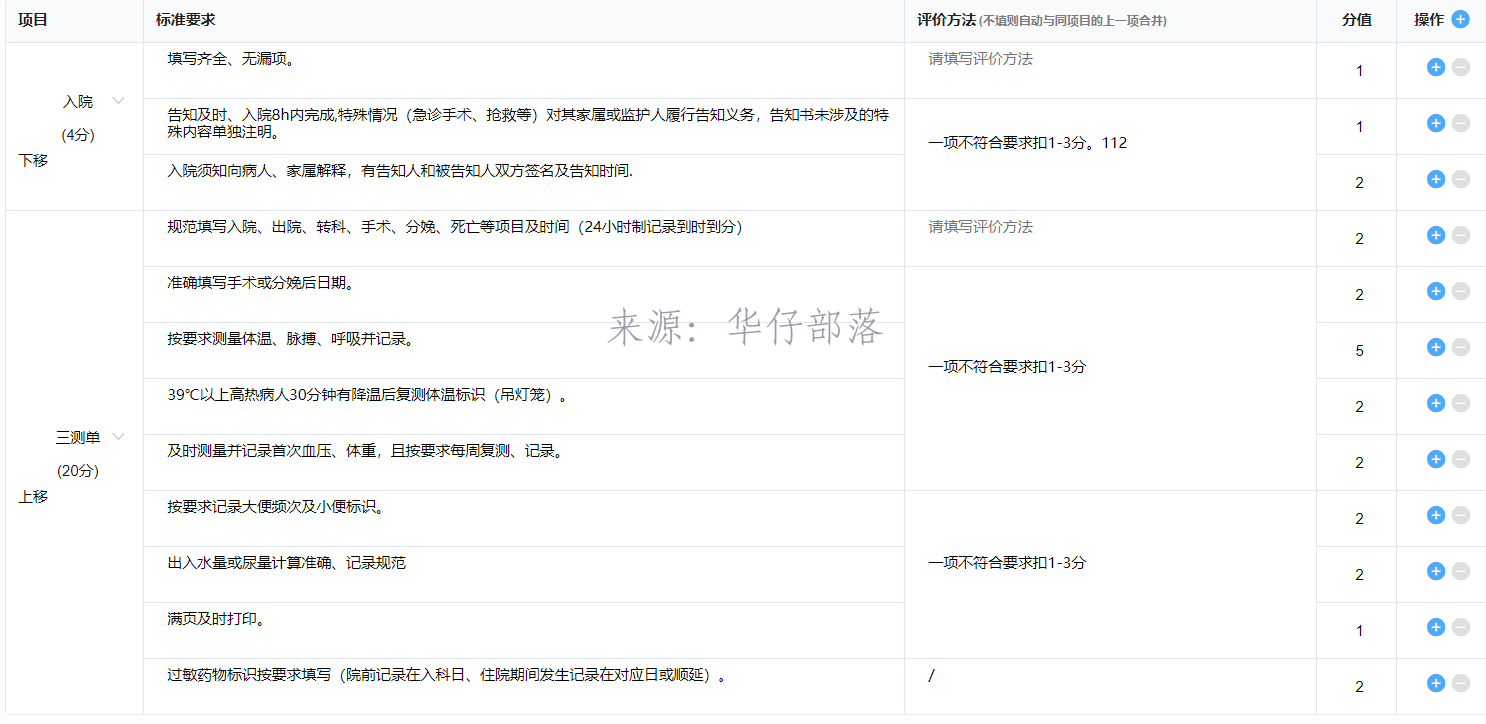
由于当前表格较为复杂,其中包含较多合并单元格,所以拖拽不大好处理,于是使用简单的上移下移按钮来替代。表格采用的是element-ui的el-table实现的。用于展示的数据是一个数组,经过合并单元格的方法处理,展现效果为上图所示。而上移、下移是基于整体项目的上移下移。vue中无需操作dom节点仅修改数据就可以达到页面的处理效果,所以上移、下移只需要修改这个用于展示的数组的数据即可。
大概思路:
如果,直接基于数组中的数据进行处理,逻辑上会较为复杂,所以可以考虑将相同项目的数据作为一个整体,调整顺序后,重新转换为分散的数据。
具体代码:
/**
  * 根据项目id转换二维数组
  * @param sourceArray 源数组 项目明细数组
  * @param targetItemId 目标项目id
  */
 convertItemArray(sourceArray, targetItemId) {
   // 目标数组
   const targetArray = []
   // 项目顺序数组 用于保存项目顺序
   const itemOrder = []
   // 项目map 用于数据分类
   const itemMap = {}
   // 传入源数组有值
   if (sourceArray && sourceArray.constructor === Array && sourceArray.length) {
     // 遍历原数组
     sourceArray.forEach(item => {
       const itemId = item.itemId
       // 项目顺序数组中不存在该项目时 添加到数组中
       if (itemOrder.indexOf(itemId) === -1) {
         itemOrder.push(itemId)
       }
       // 项目id匹配目标项目id
       if (targetItemId === itemId) {
         // 获取目标项目id对应的下标值
         this.curItemIndex = itemOrder.length - 1
       }

       // 临时项目数组
       let tempItemArray = []
       // 如果项目中存在数组 则为其赋值
       if (itemMap[itemId]) {
         tempItemArray = itemMap[itemId]
       }
       // 将项目添加到数组中
       tempItemArray.push(item)
       // 将数组添加到map中
       itemMap[itemId] = tempItemArray
     })
   }
   // 项目顺序数组有值
   if (itemOrder && itemOrder.length) {
     // 遍历项目顺序
     itemOrder.forEach(itemId => {
       // 根据项目id取出项目数组
       const tempItemArray = itemMap[itemId]
       // 添加到目标数组中
       targetArray.push(tempItemArray)
     })
   }
   // 返回目标数组
   return targetArray
 },
 /**
  * 将二维数组转换为一维数组(项目数组转换为项目明细数组)
  */
 convertItemDetailArray(sourceArray) {
   // 目标数组
   const targetArray = []
   // 判断不为空
   if (sourceArray && sourceArray.constructor === Array && sourceArray.length) {
     for (let i = 0; i < sourceArray.length; i++) {
       const itemArray = sourceArray[i]
       // 判断当前元素是数组
       if (itemArray && itemArray.constructor === Array) {
         // 当前是最后一项时
         if (i === sourceArray.length - 1) {
           // 计算最后一项下标值
           this.lastProjectIndex = targetArray.length
         }
         for (let j = 0; j < itemArray.length; j++) {
           const item = itemArray[j]
           // 重置排序号
           item.itemOrder = i
           // 添加元素到目标数组中
           targetArray.push(item)
         }
       }
     }
   }
   // 返回目标数组
   return targetArray
 },
 /**
  * 数组元素交换位置
  * @param {array} arr 数组
  * @param {number} index1 添加项目的位置
  * @param {number} index2 删除项目的位置
  * index1和index2分别是两个数组的索引值,即是两个要交换元素位置的索引值,如1,5就是数组中下标为1和5的两个元素交换位置
  */
 swapArray(arr, index1, index2) {
   arr[index1] = arr.splice(index2, 1, arr[index1])[0]
   return arr
 },
 /**
* 下移项目
* @param {Object} index
  */
 downProject(index) {
   // 获取项目id
   const itemId = this.itemDetailList[index].itemId
   // 先根据项目id转换二维数组 并给项目数组下标赋值
   const itemArray = this.convertItemArray(this.itemDetailList, itemId)
   // 下标值大于等于0
   if (this.curItemIndex >= 0) {
     // 下移 交换位置
     this.swapArray(itemArray, this.curItemIndex, this.curItemIndex + 1)
   }
   // 转换回一维数组
   this.itemDetailList = this.convertItemDetailArray(itemArray)
   // 项目合并单元格
   this.merage()
   // 评价方法合并单元格
   this.mergeIndexArr = this.getMergeArr(this.itemDetailList, 'checkMethod')
 },
 /**
  * 上移项目
  * @param {Object} index
  */
 upProject(index) {
   // 获取项目id
   const itemId = this.itemDetailList[index].itemId
   // 先根据项目id转换二维数组 并给项目数组下标赋值
   const itemArray = this.convertItemArray(this.itemDetailList, itemId)
   // 下标值-1 大于等于0
   if (this.curItemIndex - 1 >= 0) {
     // 上移 交换位置
     this.swapArray(itemArray, this.curItemIndex - 1, this.curItemIndex)
   }
   // 转换回一维数组 并且重置itemOrder 项目排序号
   this.itemDetailList = this.convertItemDetailArray(itemArray)
   // 项目合并单元格
   this.merage()
   // 评价方法合并单元格
   this.mergeIndexArr = this.getMergeArr(this.itemDetailList, 'checkMethod')
 },



还没有评论,来说两句吧...