
存储数据经常读写的内容,我们一般会存放到redis中。最开始为了方便,直接将某个业务需要用到的数据序列化后存到一个key中。随着数据量的增长,key对应的value值越来越大,随之而来的就是性能问题。在生产环境中,redis都崩溃了几次,重启后才恢复正常,原因可能有很多,猜测大key就是其中之一的问题。那么拆分大key就刻不容缓了,为保证业务稳定,还需要进行多维度的分析。
原本采用的存取方法
优点:
1、整存整取,没有数据一致性问题
2、可以整体设置失效时间
缺点:
当value的内容很大时,会有性能问题
public class RedisObjectSerializer extends Jackson2JsonRedisSerializer<Object> {
    public RedisObjectSerializer() {
        super(Object.class);
        ObjectMapper om = new ObjectMapper()
                .setVisibility(PropertyAccessor.ALL, JsonAutoDetect.Visibility.ANY)
                .enableDefaultTyping(ObjectMapper.DefaultTyping.NON_FINAL)
                .configure(DeserializationFeature.FAIL_ON_UNKNOWN_PROPERTIES, false)
                .configure(JsonParser.Feature.ALLOW_BACKSLASH_ESCAPING_ANY_CHARACTER, true)
                //日期格式
                .setDateFormat(new SimpleDateFormat(DEFAULT_DATE_TIME_FORMAT));

        SimpleModule simpleModule = new SimpleModule()
                .addDeserializer(Enum.class, EnumDeserializer.INSTANCE)
                .addSerializer(LocalDateTime.class, new LocalDateTimeSerializer(DateTimeFormatter.ofPattern(DEFAULT_DATE_TIME_FORMAT)))
                .addDeserializer(LocalDateTime.class, new LocalDateTimeDeserializer(DateTimeFormatter.ofPattern(DEFAULT_DATE_TIME_FORMAT)))
                .addSerializer(LocalDate.class,new LocalDateSerializer(DateTimeFormatter.ofPattern(DateUtils.DEFAULT_DATE_FORMAT)))
                .addDeserializer(LocalDate.class,new LocalDateDeserializer(DateTimeFormatter.ofPattern(DateUtils.DEFAULT_DATE_FORMAT)))
                ;
        om.registerModule(simpleModule);
        this.setObjectMapper(om);
    }

}

/**
 * value 序列化
 */
private static final RedisObjectSerializer OBJECT_SERIALIZER = new RedisObjectSerializer();


/**
 * 添加到带有 过期时间的  缓存
 *
 * @param key   redis主键
 * @param value 值
 * @param time  过期时间(单位秒)
 */
@Override
public void setExpire(final String key, final Object value, final long time) {
    redisTemplate.execute((RedisCallback<Long>) connection -> {
        RedisSerializer<String> serializer = getRedisSerializer();
        byte[] keys = serializer.serialize(key);
        byte[] values = OBJECT_SERIALIZER.serialize(value);
        connection.setEx(keys, time, values);
        return 1L;
    });
}

/**
 * 根据key获取对象
 *
 * @param key the key
 * @return the string
 */
@Override
public <T> T get(final String key) {
    T resultStr = redisTemplate.execute((RedisCallback<T>) connection -> {
        RedisSerializer<String> serializer = getRedisSerializer();
        byte[] keys = serializer.serialize(key);
        byte[] values = connection.get(keys);
        return (T) OBJECT_SERIALIZER.deserialize(values);
    });
    log.debug("[redisTemplate redis]取出 缓存  url:{} ", key);
    return resultStr;
}
而如果要进行拆分,则需要解决以下问题
1、以什么算法进行拆分?
2、如何统一进行存取操作?
3、如何控制缓存失效?
4、如何保证数据一致性?
5、如何支持批量操作?
先讲一下第四点,不具有共性,而是业务层面的处理,原本有多个key存储数据,value是list,多个key存在包含的关系,这也就导致相同的数据会存储多份。为减少部分数据计划改造为将公共部分单独作为key存储,而最大范围的key通过组装数据的方式进行拼接,这样就减小了数据存储的大小。因此就要解决多个key组合控制整体失效的问题。
批量操作,我们可以创建分组处理方法
// 设置分组缓存
setSplitListByExpireGroup(List<String> keys,List<List<T>> groupList, long time);
// 获取分组缓存
getSplitListLikeKeyGroup(List<String> keys);
// 清除分组缓存
clearSplitListLikeKeyGroup(List<String> keys);
拆分数据,可以通过将数据转json,然后获取byte大小,计划拆分为100k一个,根据byte大小计算拆分为多少个,再根据大小计算每个list的长度
/**
 * 计算list按照100k拆分后一共多少个
 * @param list
 * @return
 */
private <T> int calculateListSize(List<T> list){
    int listSize = 1;
    try {
        long size = JSON.toJSONString(list).getBytes().length;
        listSize = (int)Math.floor(new BigDecimal(size).divide(new BigDecimal(100 * 1024),0,BigDecimal.ROUND_CEILING).doubleValue());
        // 如果值小于等于0则重置为1
        listSize = listSize <= 0 ? 1 : listSize;
    }catch (Exception e){
        log.error(e.getMessage(),e);
    }
    return listSize;
}

// 计算每个list的长度
int oneListSize =  (int)Math.floor(new BigDecimal(list.size()).divide(new BigDecimal(listSize),0,BigDecimal.ROUND_CEILING).doubleValue());
统一存操作,我们可以将拆分后的list,拼接后缀记录下标,使用管道方式,一次性存入。
// 开启批量命令执行
int finalM = m;
redisTemplate.executePipelined((RedisCallback<Object>) connection->{
    RedisSerializer<String> serializer = getRedisSerializer();
    // 遍历拆分后的集合
    for (int i = 1; i <= listSize; i++) {
        int startIndex = Math.min((i-1) * oneListSize, list.size());
        int endIndex = Math.min(startIndex + oneListSize, list.size());
        String singleKey = "SPLIT_" + keys.get(finalM) + "_" + i;
        List<T> singleValue = new ArrayList<T>(list.subList(startIndex,endIndex));
        byte[] singleKeyByte = serializer.serialize(singleKey);
        byte[] values = OBJECT_SERIALIZER.serialize(singleValue);
        if(singleKeyByte==null || values == null){
            continue;
        }
        // 数据最大缓存12小时
        connection.setEx(singleKeyByte, 12 * 60 * 60, values);
    }
    return null;
});
统一取操作,可以根据key模糊匹配所有的key,然后根据key后缀的序号按顺序读取数据,再合并成一个list
List<Integer> orderList = new ArrayList<>();
// 开启批量命令执行
List<Object> result = redisTemplate.executePipelined((RedisCallback<Object>) connection -> {
    RedisSerializer<String> serializer = getRedisSerializer();
    if (CollectionUtils.isNotEmpty(allKeys)) {
        List<String> forKeys = new ArrayList<String>(allKeys).stream().sorted().collect(Collectors.toList());
        for (String singleKey : forKeys) {

            byte[] singleKeyByte = serializer.serialize(singleKey);
            if (singleKeyByte == null) {
                continue;
            }
            // 拆分排序号
            Integer order = Integer.parseInt(singleKey.substring(singleKey.lastIndexOf("_") + 1, singleKey.length()));
            orderList.add(order);
            connection.get(singleKeyByte);
        }
    }
    return null;
});
if (CollectionUtils.isEmpty(result)) {
    return resultList;
}
// 按顺序组装数据
for (int i = 0; i < orderList.size(); i++) {
    Object o = result.get(i);
    if(Objects.isNull(o)){
        continue;
    }
    resultList.addAll((List<T>) o);
}
相比整存整取,拆分多个key后,我们需要手动管理缓存失效,同一个key的缓存统一失效,使用系统自带的缓存失效机制,有可能失效时间不一致,导致数据不正确
在分组获取数据的方法中,拼装一个分组校验的key用于检测缓存是否失效,如果失效了,就将所有的key全部清除,然后返回空等待重新查询数据(从数据库中查询然后存入redis)
同时针对业务的批量操作,只要根据一个key模糊匹配未查询到数据,则说明单个key的缓存可能失效了,为保证整体数据有效,直接返回空等待重新查询数据(从数据库中查询然后存入redis)
// 分组校验数据
String VALID_GROUP_KEY = "VALID_GROUP_SPLIT_" + "【"+Strings.join(keys,',')+"】";

Set<String> allKeys = new HashSet<>();
// 是否存在空数据
boolean exitNull = false;
for (String key : keys) {
    // 获取模拟匹配的keys
    Set<String> curKeys = redisTemplate.keys("SPLIT_" + key + "*");
    if (CollectionUtils.isNotEmpty(curKeys)) {
        allKeys.addAll(curKeys);
    } else {
        exitNull = true;
    }
}
// 存在空数据
if (exitNull) {
    redisTemplate.delete(VALID_GROUP_KEY);
    // 直接返回空列表
    return resultList;
}

Boolean hasKey = redisTemplate.hasKey(VALID_GROUP_KEY);
// 缓存过期
if (Objects.isNull(hasKey) || !hasKey) {
    // 删除模糊匹配key的全部缓存
    redisTemplate.delete(allKeys);
    // 直接返回空列表
    return resultList;
}
关于数据一致性的问题,先来分析一下产生原因
多个请求同时操作一个key的时候,有存数据的,有清除数据的,有取数据的,每个请求中又包含多个redis指令。redis是单线程的,这样就有可能导致数据存取出现问题,虽然几率小,问题还是问题,得避免。
尝试的几种方案
1、使用redis的事务
结果:程序中使用了execute和executePipelined ,executePipelined是非原子性的,无法使用事务,如果改造成execute就失去了减小连接数的意义
2、使用Map记录当前正在执行的key,如果执行key时发现存在key,就等待,直到没有key了再执行
结果:当请求数大时,一个请求正在执行,其余请求均等待,第一个结束后,其余请求均释放,而不是一个一个执行
3、使用ReentrantLock锁的方法
结果:每个key存一个锁对象,如果key执行时,获取锁对象,然后加锁。这样的写法会导致所有的请求都会等待锁释放,有性能问题。
4、使用Map记录每个key的执行队列
结果:可满足需求
具体实现
每个key存一个队列,当前操作生成uuid,并将其存入队列尾部,循环等待,验证队列第一个内容是否为当前生成的uuid,如果是就继续执行,执行完成后删除第一个元素。如果不是就一直等待,直到匹配成功为止
// 存放队列map
private final static ConcurrentMap<String,Queue<String>> keyQueueMap = new ConcurrentHashMap<String,Queue<String>>();

private void waitAndSetKeyUsed(String key,String service,String curFlag){
    if(outKeyUsedLog){
        System.out.println(curFlag+"开始-------------------------------------------------------------------------------------------------");
        System.out.println("!"+key+"!");
    }
    // 获取uuid队列
    Queue<String> queue = Optional.ofNullable(keyQueueMap.get(key)).orElse(new LinkedList<String>());
    // 添加一个元素到末尾
    queue.add(curFlag);
    // 立即设置到缓存中
    keyQueueMap.put(key,queue);

    // 如果队列不为空
    if(CollectionUtils.isNotEmpty(queue)){
        // 循环等待
        int count = 0;
        for(;;){
            try {
                count++;
                // 获取第一个元素
                String first = StrHelper.getObjectValue(queue.peek());
                int size = queue.size();
                // 如果第一个元素就是当前传入元素
                if(curFlag.equals(first)){
                    if(outKeyUsedLog) {
                        System.out.println(service + "方法 " + key + " 请求[" + curFlag + "] " + "队列["+size+"]待执行元素匹配成功,即将执行");
                    }
                    break;
                }
                // 等待10毫秒
                Thread.sleep(10);
                if(outKeyUsedLog){
                    System.out.println(service+"方法 " + key + " 请求[" + curFlag + "] " + "队列["+size+"]待执行元素匹配失败,等待队列执行"+count*10+"毫秒");
                }
                if(count > 30 * 100){
                    if(outKeyUsedLog) {
                        System.out.println(service + "方法 " + key + " 请求[" + curFlag + "] " + "队列["+size+"]待执行元素匹配失败,等待队列执行超时30秒");
                    }
                    break;
                }
            } catch (Exception e) {
                log.error(e.getMessage(),e);
                break;
            }
        }
    }
}

private void removeKeyUsed(String key,String service,String curFlag){
    // 获取uuid队列
    Queue<String> queue = Optional.ofNullable(keyQueueMap.get(key)).orElse(new LinkedList<String>());
    // 如果队列不为空
    if(CollectionUtils.isNotEmpty(queue)){
        // 获取第一个元素
        String first = StrHelper.getObjectValue(queue.peek());
        int size = queue.size();
        // 如果第一个元素就是当前传入元素
        if(curFlag.equals(first)){
            // 弹出第一个元素
            queue.poll();
            if(outKeyUsedLog) {
                System.out.println(service + "方法 " + key + " 请求[" + curFlag + "] " + "队列["+size+"]"+curFlag+"执行完成");
            }
        }
    }
    if(outKeyUsedLog){
        System.out.println(curFlag+"结束-------------------------------------------------------------------------------------------------");
        System.out.println("");
    }
}

示例:
public void clearSplitListLikeKeyGroup(List<String> keys) {
    // 分组校验数据
    String VALID_GROUP_KEY = "VALID_GROUP_SPLIT_" + "【"+Strings.join(keys,',')+"】";
    // 当前操作标识
    String curFlag = UUID.randomUUID().toString();
    // 检查是否被占用
    waitAndSetKeyUsed(VALID_GROUP_KEY,"clearGroup",curFlag);
    try {
        // 清理数据缓存
        for (String key : keys) {
            clearSplitListLikeKey(key);
        }
        // 清理组合失效时间缓存
        clearSplitListLikeValidKey("VALID_GROUP_SPLIT_" + "【" + Strings.join(keys, ',') + "】");
    } catch (Exception e){
        log.error(e.getMessage(),e);
    } finally {
        removeKeyUsed(VALID_GROUP_KEY,"clearGroup",curFlag);
    }
}
运行示例:
接口并发请求
开始执行,队列中等待10个待执行
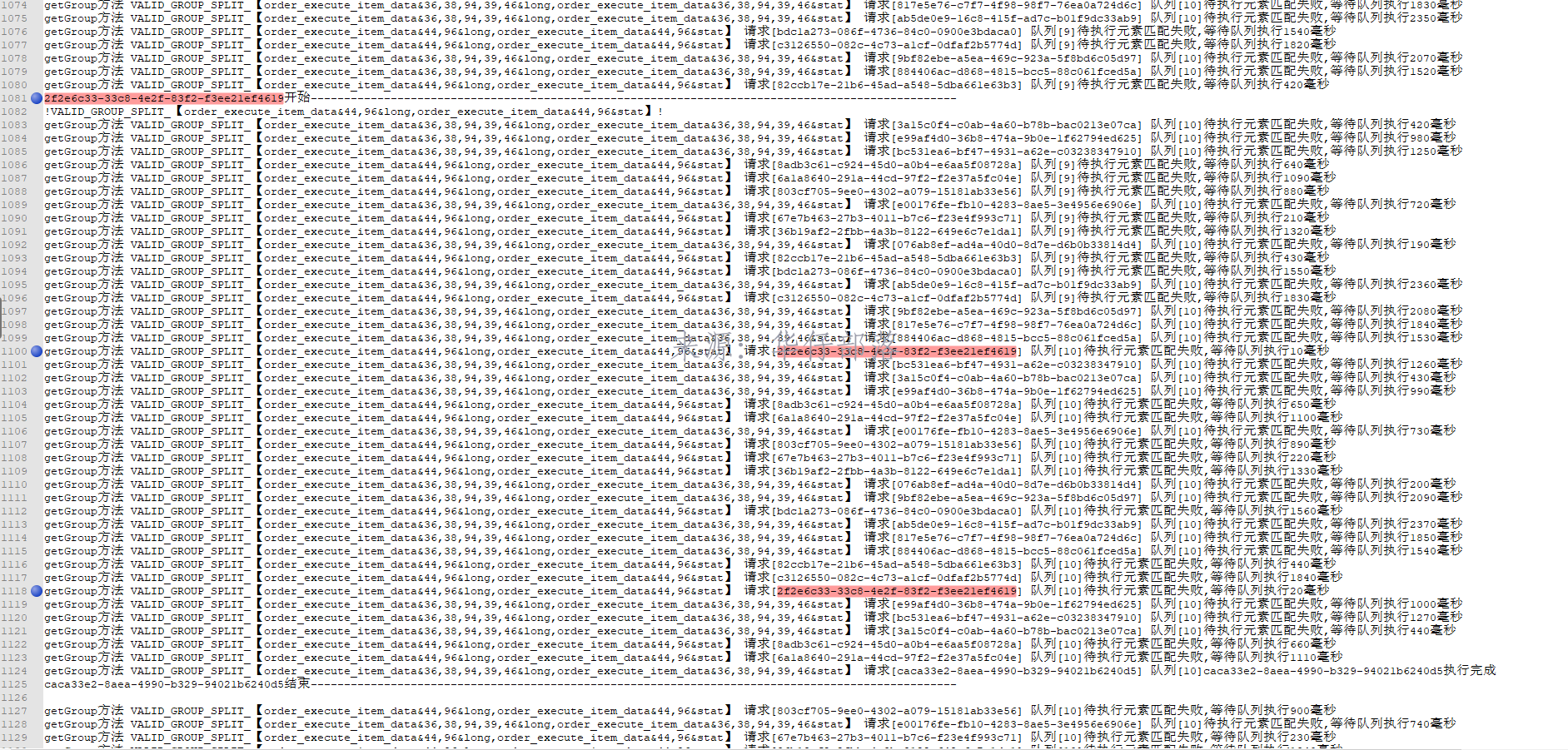
等待1910毫秒后,开始执行getGroup的业务操作
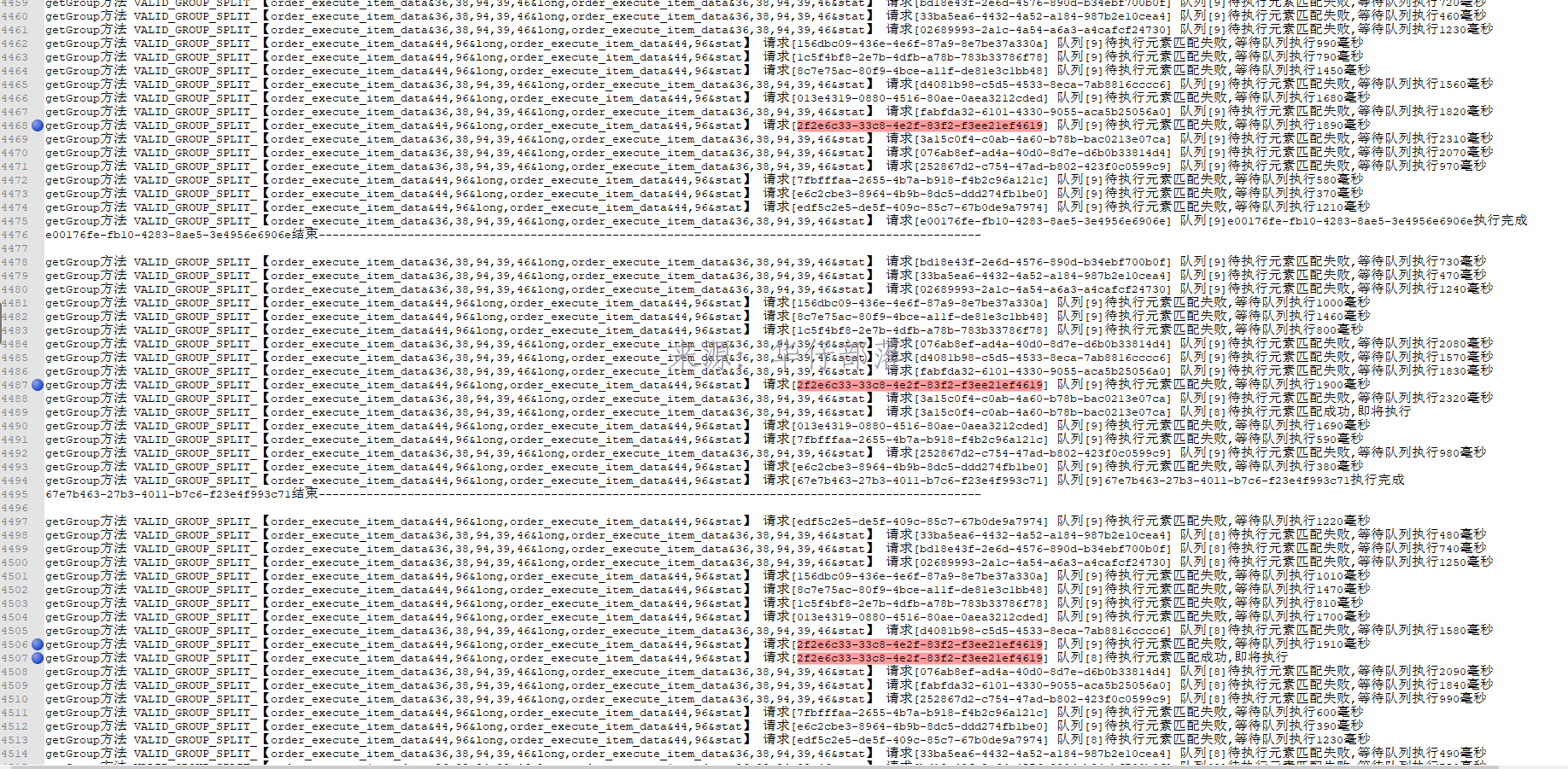 业务执行完毕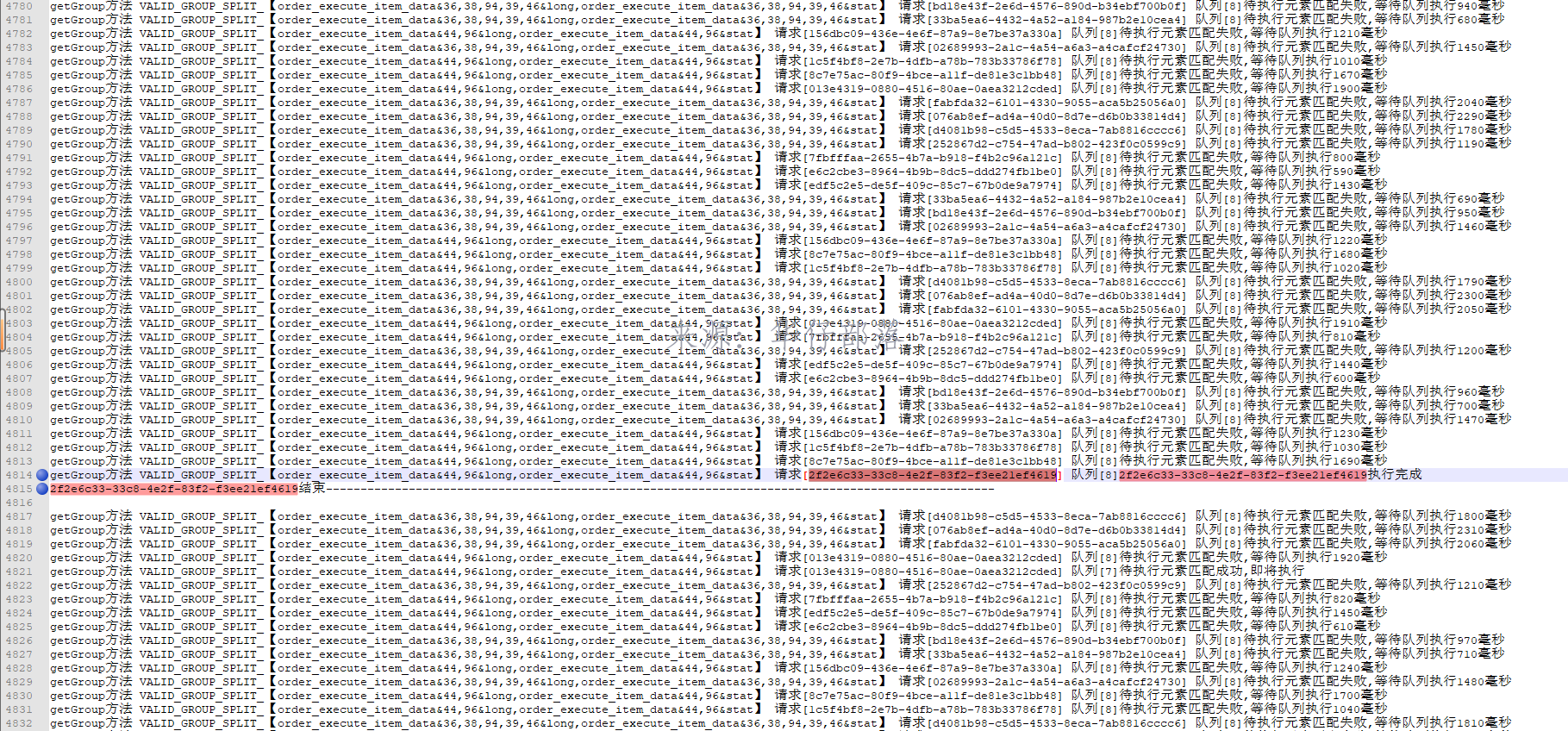
完整代码:
public class RedisObjectSerializer extends Jackson2JsonRedisSerializer<Object> {
    public RedisObjectSerializer() {
        super(Object.class);
        ObjectMapper om = new ObjectMapper()
                .setVisibility(PropertyAccessor.ALL, JsonAutoDetect.Visibility.ANY)
                .enableDefaultTyping(ObjectMapper.DefaultTyping.NON_FINAL)
                .configure(DeserializationFeature.FAIL_ON_UNKNOWN_PROPERTIES, false)
                .configure(JsonParser.Feature.ALLOW_BACKSLASH_ESCAPING_ANY_CHARACTER, true)
                //日期格式
                .setDateFormat(new SimpleDateFormat(DEFAULT_DATE_TIME_FORMAT));

        SimpleModule simpleModule = new SimpleModule()
                .addDeserializer(Enum.class, EnumDeserializer.INSTANCE)
                .addSerializer(LocalDateTime.class, new LocalDateTimeSerializer(DateTimeFormatter.ofPattern(DEFAULT_DATE_TIME_FORMAT)))
                .addDeserializer(LocalDateTime.class, new LocalDateTimeDeserializer(DateTimeFormatter.ofPattern(DEFAULT_DATE_TIME_FORMAT)))
                .addSerializer(LocalDate.class,new LocalDateSerializer(DateTimeFormatter.ofPattern(DateUtils.DEFAULT_DATE_FORMAT)))
                .addDeserializer(LocalDate.class,new LocalDateDeserializer(DateTimeFormatter.ofPattern(DateUtils.DEFAULT_DATE_FORMAT)))
                ;
        om.registerModule(simpleModule);
        this.setObjectMapper(om);
    }

}
public class RedisRepositoryImpl implements CacheRepository {
/**
* 默认编码
*/
private static final Charset DEFAULT_CHARSET = StandardCharsets.UTF_8;
/**
* value 序列化
*/
private static final RedisObjectSerializer OBJECT_SERIALIZER = new RedisObjectSerializer();
/**
* Spring Redis Template
*/
private RedisTemplate<String, Object> redisTemplate;
/**
* 存放key当前是否被使用
*/
private final static ConcurrentMap<String,ReentrantLock> keyUsedMap = new ConcurrentHashMap<String, ReentrantLock>();
// 输出日志 info级别时输出
private boolean outKeyUsedLog = log.isInfoEnabled();
// 存放队列map
private final static ConcurrentMap<String,Queue<String>> keyQueueMap = new ConcurrentHashMap<String,Queue<String>>();
public RedisRepositoryImpl(RedisTemplate<String, Object> redisTemplate) {
this.redisTemplate = redisTemplate;
}
/**
* 获取链接工厂
*/
public RedisConnectionFactory getConnectionFactory() {
return this.redisTemplate.getConnectionFactory();
}
/**
* 获取 RedisTemplate对象
*/
public RedisTemplate<String, Object> getRedisTemplate() {
return redisTemplate;
}
/**
* 清空DB
*
* @param node redis 节点
*/
public void flushDb(RedisClusterNode node) {
this.redisTemplate.opsForCluster().flushDb(node);
}
/**
* 添加到带有 过期时间的 缓存
*
* @param key redis主键
* @param value 值
* @param time 过期时间(单位秒)
*/
public void setExpire(final byte[] key, final byte[] value, final long time) {
redisTemplate.execute((RedisCallback<Long>) connection -> {
connection.setEx(key, time, value);
log.debug("[redisTemplate redis]放入 缓存 url:{} ========缓存时间为{}秒", key, time);
return 1L;
});
}
/**
* 添加到带有 过期时间的 缓存
*
* @param key redis主键
* @param value 值
* @param time 过期时间(单位秒)
*/
@Override
public void setExpire(final String key, final Object value, final long time) {
redisTemplate.execute((RedisCallback<Long>) connection -> {
RedisSerializer<String> serializer = getRedisSerializer();
byte[] keys = serializer.serialize(key);
byte[] values = OBJECT_SERIALIZER.serialize(value);
connection.setEx(keys, time, values);
return 1L;
});
}
/**
* 一次性添加数组到 过期时间的 缓存,不用多次连接,节省开销
*
* @param keys redis主键数组
* @param values 值数组
* @param time 过期时间(单位秒)
*/
public void setExpire(final String[] keys, final Object[] values, final long time) {
redisTemplate.execute((RedisCallback<Long>) connection -> {
RedisSerializer<String> serializer = getRedisSerializer();
for (int i = 0; i < keys.length; i++) {
byte[] bKeys = serializer.serialize(keys[i]);
byte[] bValues = OBJECT_SERIALIZER.serialize(values[i]);
connection.setEx(bKeys, time, bValues);
}
return 1L;
});
}
/**
* 一次性添加数组到 过期时间的 缓存,不用多次连接,节省开销
*
* @param keys the keys
* @param values the values
*/
public void set(final String[] keys, final Object[] values) {
redisTemplate.execute((RedisCallback<Long>) connection -> {
RedisSerializer<String> serializer = getRedisSerializer();
for (int i = 0; i < keys.length; i++) {
byte[] bKeys = serializer.serialize(keys[i]);
byte[] bValues = OBJECT_SERIALIZER.serialize(values[i]);
connection.set(bKeys, bValues);
}
return 1L;
});
}
/**
* 添加到缓存
*
* @param key the key
* @param value the value
*/
@Override
public void set(final String key, final Object value) {
redisTemplate.execute((RedisCallback<Long>) connection -> {
RedisSerializer<String> serializer = getRedisSerializer();
byte[] keys = serializer.serialize(key);
byte[] values = OBJECT_SERIALIZER.serialize(value);
connection.set(keys, values);
log.debug("[redisTemplate redis]放入 缓存 url:{}", key);
return 1L;
});
}
/**
* 查询在这个时间段内即将过期的key
* 注意:
* 在服务器上执行 keys 命令是非常耗时的, 在使用该方法前,请三思!!!
* 在服务器上执行 keys ** 命令是非常恐怖的,禁止执行!!!
*
* @param key the key
* @param time the time
* @return the list
*/
public List<String> willExpire(final String key, final long time) {
if (StrUtil.isEmpty(key)) {
return Collections.emptyList();
}
if ("*".equals(key.trim())) {
throw new IllegalArgumentException("禁止模糊查询所有的key");
}
final List<String> keysList = new ArrayList<>();
redisTemplate.execute((RedisCallback<List<String>>) connection -> {
Set<String> keys = redisTemplate.keys(key + "*");
for (String key1 : keys) {
Long ttl = connection.ttl(key1.getBytes(DEFAULT_CHARSET));
if (0 <= ttl && ttl <= 2 * time) {
keysList.add(key1);
}
}
return keysList;
});
return keysList;
}
/**
* 查询在以keyPatten的所有 key
* 注意:
* 在服务器上执行 keys 命令是非常耗时的, 在使用该方法前,请三思!!!
* 在服务器上执行 keys ** 命令是非常恐怖的,禁止执行!!!
*
* @param keyPatten the key patten
* @return the set
*/
@Override
public Set<String> keys(final String keyPatten) {
if (StrUtil.isEmpty(keyPatten)) {
return Collections.emptySet();
}
if ("*".equals(keyPatten.trim())) {
throw new IllegalArgumentException("禁止模糊查询所有的key");
}
return redisTemplate.execute((RedisCallback<Set<String>>) connection -> redisTemplate.keys(keyPatten + "*"));
}
/**
* 根据key获取对象
*
* @param key the key
* @return the byte [ ]
*/
public byte[] get(final byte[] key) {
byte[] result = redisTemplate.execute((RedisCallback<byte[]>) connection -> connection.get(key));
log.debug("[redisTemplate redis]取出 缓存 url:{} ", key);
return result;
}
/**
* 根据key获取对象
*
* @param key the key
* @return the string
*/
@Override
public <T> T get(final String key) {
T resultStr = redisTemplate.execute((RedisCallback<T>) connection -> {
RedisSerializer<String> serializer = getRedisSerializer();
byte[] keys = serializer.serialize(key);
byte[] values = connection.get(keys);
return (T) OBJECT_SERIALIZER.deserialize(values);
});
log.debug("[redisTemplate redis]取出 缓存 url:{} ", key);
return resultStr;
}
private void removeKeyUsed(String key,String service,String curFlag){
// 获取uuid队列
Queue<String> queue = Optional.ofNullable(keyQueueMap.get(key)).orElse(new LinkedList<String>());
// 如果队列不为空
if(CollectionUtils.isNotEmpty(queue)){
// 获取第一个元素
String first = StrHelper.getObjectValue(queue.peek());
int size = queue.size();
// 如果第一个元素就是当前传入元素
if(curFlag.equals(first)){
// 弹出第一个元素
queue.poll();
if(outKeyUsedLog) {
System.out.println(service + "方法 " + key + " 请求[" + curFlag + "] " + "队列["+size+"]"+curFlag+"执行完成");
}
}
}
if(outKeyUsedLog){
System.out.println(curFlag+"结束-------------------------------------------------------------------------------------------------");
System.out.println("");
}
}
private void waitAndSetKeyUsed(String key,String service,String curFlag){
if(outKeyUsedLog){
System.out.println(curFlag+"开始-------------------------------------------------------------------------------------------------");
System.out.println("!"+key+"!");
}
// 获取uuid队列
Queue<String> queue = Optional.ofNullable(keyQueueMap.get(key)).orElse(new LinkedList<String>());
// 添加一个元素到末尾
queue.add(curFlag);
// 立即设置到缓存中
keyQueueMap.put(key,queue);
// 如果队列不为空
if(CollectionUtils.isNotEmpty(queue)){
// 循环等待
int count = 0;
for(;;){
try {
count++;
// 获取第一个元素
String first = StrHelper.getObjectValue(queue.peek());
int size = queue.size();
// 如果第一个元素就是当前传入元素
if(curFlag.equals(first)){
if(outKeyUsedLog) {
System.out.println(service + "方法 " + key + " 请求[" + curFlag + "] " + "队列["+size+"]待执行元素匹配成功,即将执行");
}
break;
}
// 等待10毫秒
Thread.sleep(10);
if(outKeyUsedLog){
System.out.println(service+"方法 " + key + " 请求[" + curFlag + "] " + "队列["+size+"]待执行元素匹配失败,等待队列执行"+count*10+"毫秒");
}
if(count > 30 * 100){
if(outKeyUsedLog) {
System.out.println(service + "方法 " + key + " 请求[" + curFlag + "] " + "队列["+size+"]待执行元素匹配失败,等待队列执行超时30秒");
}
break;
}
} catch (Exception e) {
log.error(e.getMessage(),e);
break;
}
}
}
}
@Override
public void clearSplitListLikeKeyGroup(List<String> keys) {
// 分组校验数据
String VALID_GROUP_KEY = "VALID_GROUP_SPLIT_" + "【"+Strings.join(keys,',')+"】";
// 当前操作标识
String curFlag = UUID.randomUUID().toString();
// 检查是否被占用
waitAndSetKeyUsed(VALID_GROUP_KEY,"clearGroup",curFlag);
try {
// 清理数据缓存
for (String key : keys) {
clearSplitListLikeKey(key);
}
// 清理组合失效时间缓存
clearSplitListLikeValidKey("VALID_GROUP_SPLIT_" + "【" + Strings.join(keys, ',') + "】");
} catch (Exception e){
log.error(e.getMessage(),e);
} finally {
removeKeyUsed(VALID_GROUP_KEY,"clearGroup",curFlag);
}
}
@Override
public void clearSplitListLikeKey(String key){
key = "SPLIT_" + key;
// 当前操作标识
String curFlag = UUID.randomUUID().toString();
// 等待和设置key占用情况
waitAndSetKeyUsed("VALID_"+key,"clear",curFlag);
try {
// 获取模拟匹配的keys
Set<String> keys = redisTemplate.keys(key + "*");
keys = Optional.ofNullable(keys).orElse(new HashSet<>());
if (CollectionUtils.isNotEmpty(keys)) {
// 删除模糊匹配key的全部缓存
redisTemplate.delete(keys);
}
// 自动清理 失效时间缓存
clearSplitListLikeValidKey("VALID_" + key);
} catch (Exception e){
log.error(e.getMessage(),e);
} finally {
removeKeyUsed("VALID_"+key,"clear",curFlag);
}
}
@Override
public void clearSplitListLikeValidKey(String validKey) {
// 获取模拟匹配的keys
Set<String> keys = redisTemplate.keys( validKey + "*");
keys = Optional.ofNullable(keys).orElse(new HashSet<>());
if(CollectionUtils.isNotEmpty(keys)){
// 删除模糊匹配key的全部缓存
redisTemplate.delete(keys);
}
}
@Override
public void clearSplitListLikeKeyAllKey(String key) {
// 获取模拟匹配的keys
Set<String> keys = redisTemplate.keys( "*" + key + "*");
keys = Optional.ofNullable(keys).orElse(new HashSet<>());
if(CollectionUtils.isNotEmpty(keys)){
// 删除模糊匹配key的全部缓存
redisTemplate.delete(keys);
}
}
@Override
public <T> List<T> getSplitListLikeKeyGroup(List<String> keys) {
List<T> resultList = new ArrayList<T>();
if(CollectionUtils.isEmpty(keys)){
return resultList;
}
keys = keys.stream().sorted().collect(Collectors.toList());
// 当前操作标识
String curFlag = UUID.randomUUID().toString();
// 分组校验数据
String VALID_GROUP_KEY = "VALID_GROUP_SPLIT_" + "【"+Strings.join(keys,',')+"】";
// 等待和设置key占用情况
waitAndSetKeyUsed(VALID_GROUP_KEY,"getGroup",curFlag);
Set<String> allKeys = new HashSet<>();
try {
// 是否存在空数据
boolean exitNull = false;
for (String key : keys) {
// 获取模拟匹配的keys
Set<String> curKeys = redisTemplate.keys("SPLIT_" + key + "*");
if (CollectionUtils.isNotEmpty(curKeys)) {
allKeys.addAll(curKeys);
} else {
exitNull = true;
}
}
// 存在空数据
if (exitNull) {
redisTemplate.delete(VALID_GROUP_KEY);
// 直接返回空列表
return resultList;
}
Boolean hasKey = redisTemplate.hasKey(VALID_GROUP_KEY);
// 缓存过期
if (Objects.isNull(hasKey) || !hasKey) {
// 删除模糊匹配key的全部缓存
redisTemplate.delete(allKeys);
// 直接返回空列表
return resultList;
}
List<Integer> orderList = new ArrayList<>();
// 开启批量命令执行
List<Object> result = redisTemplate.executePipelined((RedisCallback<Object>) connection -> {
RedisSerializer<String> serializer = getRedisSerializer();
if (CollectionUtils.isNotEmpty(allKeys)) {
List<String> forKeys = new ArrayList<String>(allKeys).stream().sorted().collect(Collectors.toList());
for (String singleKey : forKeys) {
byte[] singleKeyByte = serializer.serialize(singleKey);
if (singleKeyByte == null) {
continue;
}
// 拆分排序号
Integer order = Integer.parseInt(singleKey.substring(singleKey.lastIndexOf("_") + 1, singleKey.length()));
orderList.add(order);
connection.get(singleKeyByte);
}
}
return null;
});
if (CollectionUtils.isEmpty(result)) {
return resultList;
}
// 按顺序组装数据
for (int i = 0; i < orderList.size(); i++) {
Object o = result.get(i);
if(Objects.isNull(o)){
continue;
}
resultList.addAll((List<T>) o);
}
} catch (Exception e){
log.error(e.getMessage(),e);
} finally {
removeKeyUsed(VALID_GROUP_KEY,"getGroup",curFlag);
}
return resultList;
}
@Override
public <T> List<T> getSplitListLikeKey(String key){
List<T> resultList = new ArrayList<T>();
key = "SPLIT_" + key;
// 验证缓存key
String VALID_KEY = "VALID_" + key;
// 当前操作标识
String curFlag = UUID.randomUUID().toString();
try {
// 等待和设置key占用情况
waitAndSetKeyUsed(VALID_KEY,"get",curFlag);
// 获取模拟匹配的keys
Set<String> keys = redisTemplate.keys(key + "*");
// 未匹配到key
if (CollectionUtils.isEmpty(keys)) {
// 直接返回空列表
return resultList;
}
Boolean hasKey = redisTemplate.hasKey(VALID_KEY);
// 缓存过期
if (Objects.isNull(hasKey) || !hasKey) {
// 删除模糊匹配key的全部缓存
redisTemplate.delete(keys);
// 直接返回空列表
return resultList;
}
List<Integer> orderList = new ArrayList<>();
// 开启批量命令执行
List<Object> result = redisTemplate.executePipelined((RedisCallback<Object>) connection -> {
RedisSerializer<String> serializer = getRedisSerializer();
if (CollectionUtils.isNotEmpty(keys)) {
for (String singleKey : keys) {
byte[] singleKeyByte = serializer.serialize(singleKey);
if (singleKeyByte == null) {
continue;
}
// 拆分排序号
Integer order = Integer.parseInt(singleKey.substring(singleKey.lastIndexOf("_") + 1, singleKey.length()));
orderList.add(order);
connection.get(singleKeyByte);
}
}
return null;
});
if (CollectionUtils.isEmpty(result)) {
return resultList;
}
// 按顺序组装数据
for (int i = 0; i < orderList.size(); i++) {
Object o = result.get(i);
resultList.addAll((List<T>) o);
}
} catch (Exception e){
log.error(e.getMessage(),e);
} finally {
removeKeyUsed(VALID_KEY,"get",curFlag);
}
return resultList;
}
/**
* 计算list按照100k拆分后一共多少个
* @param list
* @return
*/
private <T> int calculateListSize(List<T> list){
int listSize = 1;
try {
long size = JSON.toJSONString(list).getBytes().length;
listSize = (int)Math.floor(new BigDecimal(size).divide(new BigDecimal(100 * 1024),0,BigDecimal.ROUND_CEILING).doubleValue());
// 如果值小于等于0则重置为1
listSize = listSize <= 0 ? 1 : listSize;
}catch (Exception e){
log.error(e.getMessage(),e);
}
return listSize;
}
@Override
public <T> void setSplitListByExpireGroup(List<String> keys, List<List<T>> groupList, long time) {
if(CollectionUtils.isEmpty(keys)){
return;
}
List<String> tempKeys = keys.stream().sorted().collect(Collectors.toList());
// 分组校验数据
String VALID_GROUP_KEY = "VALID_GROUP_SPLIT_" + "【"+Strings.join(tempKeys,',')+"】";
// 当前操作标识
String curFlag = UUID.randomUUID().toString();
// 等待和设置key占用情况
waitAndSetKeyUsed(VALID_GROUP_KEY,"setGroup",curFlag);
try{
Set<String> allKeys = new HashSet<>();
for (String key : keys) {
// 获取模拟匹配的keys
Set<String> curKeys = redisTemplate.keys("SPLIT_" + key + "*");
if(CollectionUtils.isNotEmpty(curKeys)){
allKeys.addAll(curKeys);
}
}
if(CollectionUtils.isNotEmpty(allKeys)){
// 删除模糊匹配key的全部缓存
redisTemplate.delete(allKeys);
}
// 设置分组缓存key失效
setExpire(VALID_GROUP_KEY,"【"+Strings.join(keys,',')+"】",time);
for (int m = 0; m < groupList.size(); m++) {
List<T> list = groupList.get(m);
// 计算需要拆分多少个List
int listSize = calculateListSize(list);
// 计算每个list的长度
int oneListSize = (int)Math.floor(new BigDecimal(list.size()).divide(new BigDecimal(listSize),0,BigDecimal.ROUND_CEILING).doubleValue());
// 开启批量命令执行
int finalM = m;
redisTemplate.executePipelined((RedisCallback<Object>) connection->{
RedisSerializer<String> serializer = getRedisSerializer();
// 遍历拆分后的集合
for (int i = 1; i <= listSize; i++) {
int startIndex = Math.min((i-1) * oneListSize, list.size());
int endIndex = Math.min(startIndex + oneListSize, list.size());
String singleKey = "SPLIT_" + keys.get(finalM) + "_" + i;
List<T> singleValue = new ArrayList<T>(list.subList(startIndex,endIndex));
byte[] singleKeyByte = serializer.serialize(singleKey);
byte[] values = OBJECT_SERIALIZER.serialize(singleValue);
if(singleKeyByte==null || values == null){
continue;
}
// 数据最大缓存12小时
connection.setEx(singleKeyByte, 12 * 60 * 60, values);
}
return null;
});
}
} catch (Exception e){
log.error(e.getMessage(),e);
} finally {
removeKeyUsed(VALID_GROUP_KEY,"setGroup",curFlag);
}
}
@Override
public <T> void setSplitListByExpire(String key,List<T> list,long time) {
key = "SPLIT_" + key;
String VALID_KEY = "VALID_" + key;
// 当前操作标识
String curFlag = UUID.randomUUID().toString();
// 等待和设置key占用情况
waitAndSetKeyUsed(VALID_KEY,"set",curFlag);
try {
// 获取模拟匹配的keys
Set<String> keys = redisTemplate.keys(key + "*");
if (CollectionUtils.isNotEmpty(keys)) {
// 删除模糊匹配key的全部缓存
redisTemplate.delete(keys);
}
// 设置缓存key失效
setExpire(VALID_KEY, key, time);
// 计算需要拆分多少个List
int listSize = calculateListSize(list);
// 计算每个list的长度
int oneListSize = (int) Math.floor(new BigDecimal(list.size()).divide(new BigDecimal(listSize), 0, BigDecimal.ROUND_CEILING).doubleValue());
// 开启批量命令执行
String finalKey = key;
redisTemplate.executePipelined((RedisCallback<Object>) connection -> {
RedisSerializer<String> serializer = getRedisSerializer();
// 遍历拆分后的集合
for (int i = 1; i < listSize; i++) {
int startIndex = Math.min((i - 1) * oneListSize, list.size());
int endIndex = Math.min(startIndex + oneListSize, list.size());
String singleKey = finalKey + "_" + i;
List<T> singleValue = new ArrayList<T>(list.subList(startIndex, endIndex));
byte[] singleKeyByte = serializer.serialize(singleKey);
byte[] values = OBJECT_SERIALIZER.serialize(singleValue);
if (singleKeyByte == null || values == null) {
continue;
}
connection.setEx(singleKeyByte, 12 * 60 * 60, values);
}
return null;
});
}catch (Exception e){
log.error(e.getMessage(),e);
} finally {
removeKeyUsed(VALID_KEY,"set",curFlag);
}
}
@Override
public <T> T getOrDef(String key, Function<String, ? extends T> function) {
T resultStr = get(key);
if (resultStr == null) {
T value = function.apply(key);
if (value != null) {
set(key, value);
}
return value;
}
return resultStr;
}
@Override
public <T> T getOrDefSetExpire(String key, Function<String, ? extends T> function, long time) {
T resultStr = get(key);
if (resultStr == null) {
T value = function.apply(key);
if (value != null) {
setExpire(key,value,time);
}
return value;
}
return resultStr;
}
/**
* 根据key获取对象
*
* @param keyPatten the key patten
* @return the keys values
*/
public Map<String, Object> getKeysValues(final String keyPatten) {
log.debug("[redisTemplate redis] getValues() patten={} ", keyPatten);
return redisTemplate.execute((RedisCallback<Map<String, Object>>) connection -> {
RedisSerializer<String> serializer = getRedisSerializer();
Map<String, Object> maps = new HashMap<>(16);
Set<String> keys = redisTemplate.keys(keyPatten + "*");
if (CollectionUtil.isNotEmpty(keys)) {
for (String key : keys) {
byte[] bKeys = serializer.serialize(key);
byte[] bValues = connection.get(bKeys);
Object value = OBJECT_SERIALIZER.deserialize(bValues);
maps.put(key, value);
}
}
return maps;
});
}
/**
* Ops for hash hash operations.
*
* @return the hash operations
*/
public <T> HashOperations<String, String, T> opsForHash() {
return redisTemplate.opsForHash();
}
/**
* 对HashMap操作
*
* @param key the key
* @param hashKey the hash key
* @param hashValue the hash value
*/
public void putHashValue(String key, String hashKey, Object hashValue) {
log.debug("[redisTemplate redis] putHashValue() key={},hashKey={},hashValue={} ", key, hashKey, hashValue);
opsForHash().put(key, hashKey, hashValue);
}
/**
* 获取单个field对应的值
*
* @param key the key
* @param hashKey the hash key
* @return the hash values
*/
public <T> T getHashValues(String key, String hashKey) {
log.debug("[redisTemplate redis] getHashValues() key={},hashKey={}", key, hashKey);
return (T) opsForHash().get(key, hashKey);
}
/**
* 根据key值删除
*
* @param key the key
* @param hashKeys the hash keys
*/
public void delHashValues(String key, Object... hashKeys) {
log.debug("[redisTemplate redis] delHashValues() key={}", key);
opsForHash().delete(key, hashKeys);
}
@Override
public void delHashValuesLikeKey(String key, String hashLikeKey) {
log.debug("[redisTemplate redis] delHashValuesLikeKey() key={}", key);
HashOperations<String, String, Object> operations = opsForHash();
Set<String> keys = operations.keys(key);
List<String> collect = keys.stream().filter(e -> StringUtils.startsWith(e, hashLikeKey)).collect(Collectors.toList());
if(CollectionUtil.isNotEmpty(collect)){
operations.delete(key,collect.toArray());
}
}
/**
* key只匹配map
*
* @param key the key
* @return the hash value
*/
public Map<String, Object> getHashValue(String key) {
log.debug("[redisTemplate redis] getHashValue() key={}", key);
return opsForHash().entries(key);
}
/**
* 批量添加
*
* @param key the key
* @param map the map
*/
public void putHashValues(String key, Map<String, Object> map) {
opsForHash().putAll(key, map);
}
/**
* 集合数量
*
* @return the long
*/
public long dbSize() {
return redisTemplate.execute(RedisServerCommands::dbSize);
}
/**
* 清空redis存储的数据
*
* @return the string
*/
@Override
public void flushDb() {
redisTemplate.execute((RedisCallback<String>) connection -> {
connection.flushDb();
return "ok";
});
}
/**
* 判断某个主键是否存在
*
* @param key the key
* @return the boolean
*/
@Override
public boolean exists(final String key) {
return redisTemplate.execute((RedisCallback<Boolean>) connection -> connection.exists(key.getBytes(DEFAULT_CHARSET)));
}
/**
* 删除key
*
* @param keys the keys
* @return the long
*/
@Override
public long del(final String... keys) {
return redisTemplate.execute((RedisCallback<Long>) connection -> {
long result = 0;
for (String key : keys) {
result += connection.del(key.getBytes(DEFAULT_CHARSET));
}
return result;
});
}
/**
* 模糊删除key
* */
@Override
public long likeDel(String key){
Set<String> keys = redisTemplate.keys(key+":" + "*");
Long delete = redisTemplate.delete(keys);
return delete;
}
/**
* 获取 RedisSerializer
*
* @return the redis serializer
*/
protected RedisSerializer<String> getRedisSerializer() {
return redisTemplate.getStringSerializer();
}
/**
* 对某个主键对应的值加一,value值必须是全数字的字符串
*
* @param key the key
* @return the long
*/
public long incr(final String key) {
return redisTemplate.execute((RedisCallback<Long>) connection -> {
RedisSerializer<String> redisSerializer = getRedisSerializer();
return connection.incr(redisSerializer.serialize(key));
});
}
/**
* redis List 引擎
*
* @return the list operations
*/
@Override
public ListOperations<String, Object> opsForList() {
return redisTemplate.opsForList();
}
@Override
public SetOperations<String, Object> opsForSet() {
return redisTemplate.opsForSet();
}
/**
* redis List数据结构 : 将一个或多个值 value 插入到列表 key 的表头
*
* @param key the key
* @param value the value
* @return the long
*/
public Long leftPush(String key, Object value) {
return opsForList().leftPush(key, value);
}
/**
* redis List数据结构 : 移除并返回列表 key 的头元素
*
* @param key the key
* @return the string
*/
@Override
public Object leftPop(String key) {
return opsForList().leftPop(key);
}
/**
* redis List数据结构 :将一个或多个值 value 插入到列表 key 的表尾(最右边)。
*
* @param key the key
* @param value the value
* @return the long
*/
@Override
public Long rightPush(String key, Object value) {
return opsForList().rightPush(key, value);
}
/**
* redis List数据结构 : 移除并返回列表 key 的末尾元素
*
* @param key the key
* @return the string
*/
public Object rightPop(String key) {
return opsForList().rightPop(key);
}
/**
* redis List数据结构 : 返回列表 key 的长度 ; 如果 key 不存在,则 key 被解释为一个空列表,返回 0 ; 如果 key 不是列表类型,返回一个错误。
*
* @param key the key
* @return the long
*/
public Long length(String key) {
return opsForList().size(key);
}
/**
* redis List数据结构 : 根据参数 i 的值,移除列表中与参数 value 相等的元素
*
* @param key the key
* @param i the
* @param value the value
*/
public void remove(String key, long i, Object value) {
opsForList().remove(key, i, value);
}
/**
* redis List数据结构 : 将列表 key 下标为 index 的元素的值设置为 value
*
* @param key the key
* @param index the index
* @param value the value
*/
public void set(String key, long index, Object value) {
opsForList().set(key, index, value);
}
/**
* redis List数据结构 : 返回列表 key 中指定区间内的元素,区间以偏移量 [start 和 end] 指定。
*
* @param key the key
* @param start list的开始位置 (包含)
* @param end list的结束位置 (包含)
* @return the list
*/
public <T> List<T> getList(String key, int start, int end) {
return (List<T>) opsForList().range(key, start, end);
}
/**
* redis List数据结构 : 批量存储
*
* @param key the key
* @param list the list
* @return the long
*/
public <V> Long leftPushAll(String key, List<V> list) {
return opsForList().leftPushAll(key, list);
}
/**
* redis List数据结构 : 将值 value 插入到列表 key 当中,位于值 index 之前或之后,默认之后。
*
* @param key the key
* @param index the index
* @param value the value
*/
public void insert(String key, long index, Object value) {
opsForList().set(key, index, value);
}
@Override
public Boolean hasKey(String key) {
return redisTemplate.hasKey(key);
}
@Override
public <V> List<V> sinter(String key, List<V> list){
return (List<V>) opsForSet().intersect(key, (Collection<String>) list);
}
/**
* <p>
* 获取指定访问数据 并且删除这些数据
* </p>
* TODO ZhongYuXing 不具备原子性 需要改成 lua脚本
* */
public <T> Set<T> getScope(String key , Long min, Long max){
Set<T> s = (Set<T>) redisTemplate.opsForZSet().reverseRangeByScore(key, min, max);
for (T t : s) {
redisTemplate.opsForZSet().remove(key,t);
}
return s;
}
public void addScope(String key , Object value, Long scope){
redisTemplate.opsForZSet().add(key, value, scope);
}
public <T> Set<T> getScope(String key , Long scope){
return (Set<T>)redisTemplate.opsForZSet().reverseRangeByScore(key, scope, scope);
}
public void delScope(String key , Object value){
redisTemplate.opsForZSet().remove(key, value);
}
@Override
public <T> List<T> getAllList(String key) {
return (List<T>) redisTemplate.opsForList().range(key,0,-1);
}
@Override
public Set<String> getAllKeyLikeKey(String key){
Set<String> sets =new HashSet<>();
String patternKey = key + "*";
ScanOptions options = ScanOptions.scanOptions()
//这里指定每次扫描key的数量(很多博客瞎说要指定Integer.MAX_VALUE,这样的话跟 keys有什么区别?)
.count(10000)
.match(patternKey).build();
RedisSerializer<String> redisSerializer = (RedisSerializer<String>) redisTemplate.getKeySerializer();
Cursor cursor = redisTemplate.executeWithStickyConnection(redisConnection ->
new ConvertingCursor<>(redisConnection.scan(options), redisSerializer::deserialize));
while(cursor.hasNext()){
sets.add(StrHelper.getObjectValue(cursor.next()));
}
try{
//切记这里一定要关闭,否则会耗尽连接数。报Cannot get Jedis connection; nested exception is redis.clients.jedis.exceptions.JedisException: Could not get a
cursor.close();
}catch (Exception ex) {
System.out.println(ex.getMessage());
log.error(ex.getMessage());
}
return sets;
}
@Override
public <T> Set<T> getZSetByKey(String key) {
return (Set<T>) redisTemplate.opsForZSet().range(key,0,-1);
}
@Override
public long delLikeKey(String key) {
//获取以该key开头的keys
Set<String> keys = this.getAllKeyLikeKey(key);
redisTemplate.delete(keys);
return 0;
}
}

发表评论