
之前做了题库的word导入以及在线文本导入功能。其中word导入是采用的Apache POI技术,直接读取文件段落,然后解析成对应题目。由于格式过于固化,且反复修改响应时间较长操作不方便,后面直接由前端实现了在线文本导入功能。可视化展示题目解析效果,方便快捷。
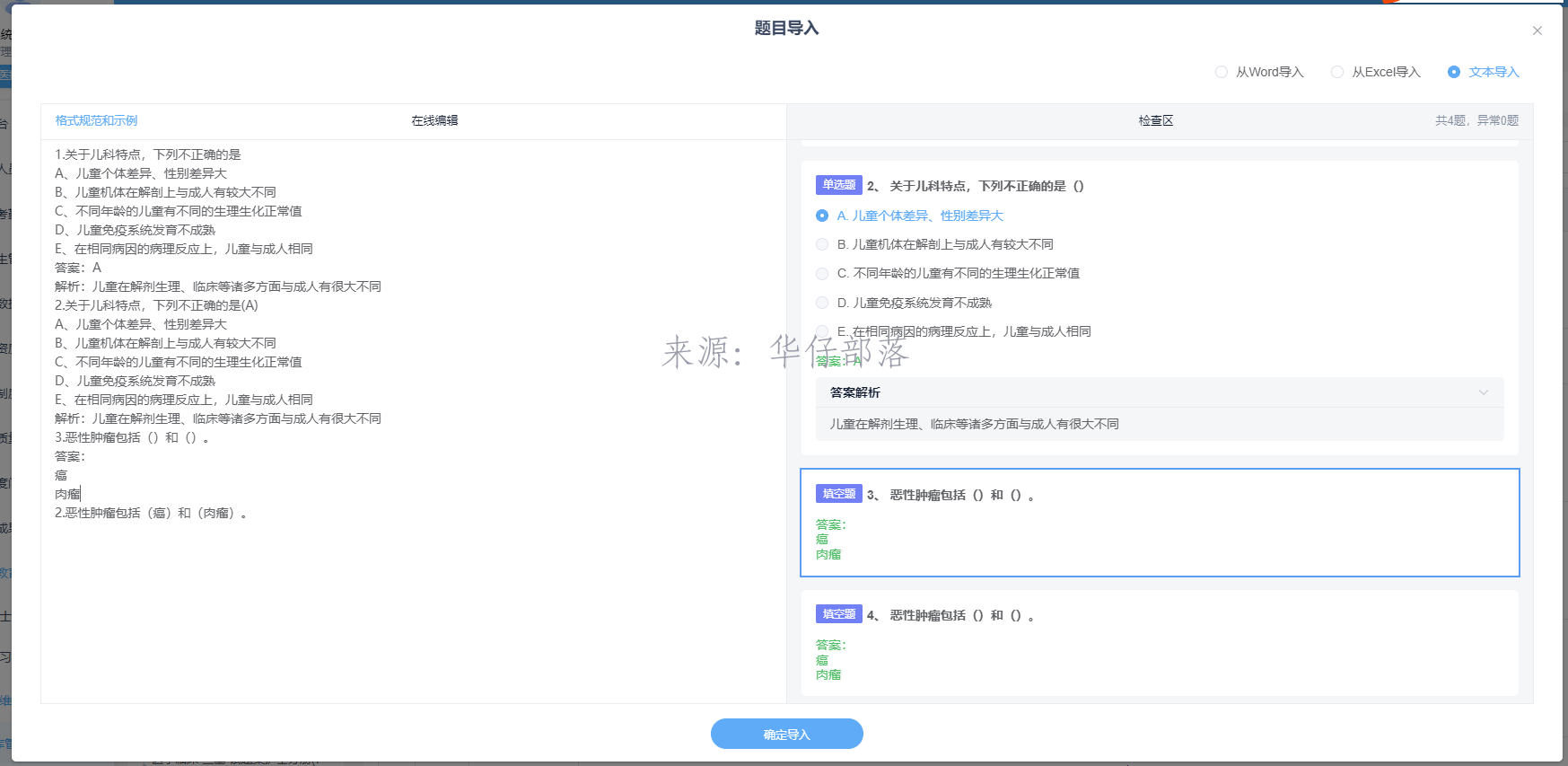
有了导入功能之后,又要增加导出功能,将系统中的题目以word形式导出到文件,并且最好要兼容文本导入的格式。
于是有了以下几种选择:
1、采用前端导出,使用docxtemplater插件。
2、后端使用easypoi模板导出。
3、后端使用apachepoi导出。
经过技术验证
方案一
优点:
1、前端现成组件,开发成本低。
2、导出支持图片。
缺点:
1、实际场景下题目很多,导出很慢,甚至卡死。
方案二
优点:
1、支持模板导出,样式方便调整。
缺点:
1、模板条件表达式仅支持表格下生效,而实际导出效果不需要表格。
2、图片支持情况未验证。
方案三:
优点:
1、直接在代码中编写逻辑,无需处理表达式问题。
2、支持图片导出。
3、速度比较快。
缺点:
1、没有可视化界面直观看效果,调整样式需要修改后端代码。
最终选择了方案三
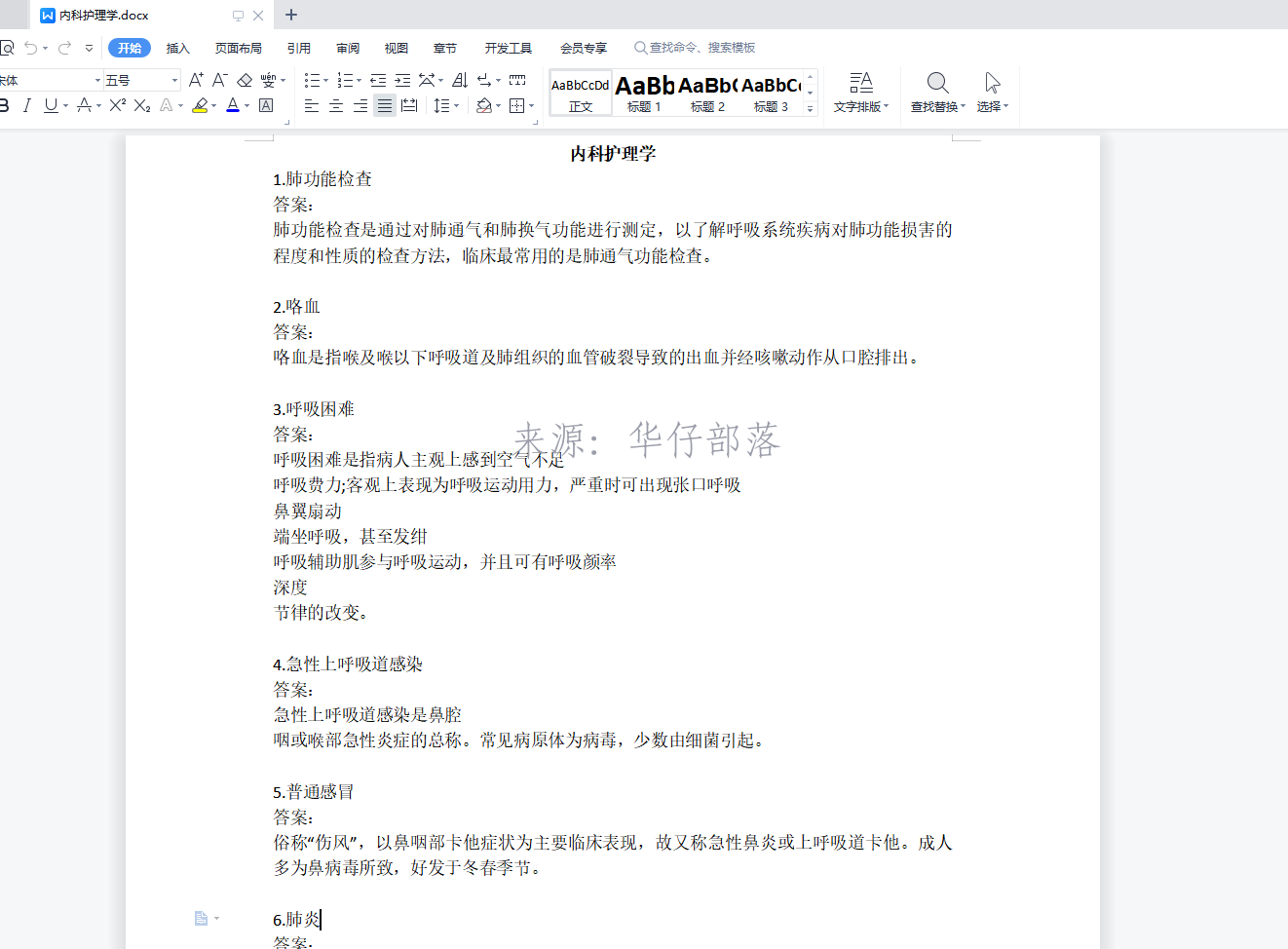
实现代码:
controller
/**
 * 导出题目word
 */
@ApiOperation(value = "导出题目word", notes = "导出题目word")
@GetMapping(value = "/exportSubjectsByWord")
public void exportSubjectsByWord(@RequestParam("subjectCategory") Integer subjectCategory,@RequestParam(value = "subjectType",required = false) String subjectType, HttpServletResponse response) {
    try {
        examSubjectService.exportSubjectsByWord(subjectCategory,subjectType,response);
    }catch (Exception ex) {
        LogPrintUtil.formatOutput(ex, "[ExamSubjectController.exportSubjectsByWord]导出题目word错误,联系系统管理员处理!");
    }
}
service
public void exportSubjectsByWord(Integer subjectCategory,String subjectType,HttpServletResponse response) throws IOException, InvalidFormatException {
    // 根据分类id查询全部题库数据
    List<ExamSubjectSaveDTO> examSubjectSaveDTOS = queryExamSubjectSaveDTOByCategory(subjectCategory,subjectType);
    // 查询题库
    ExamSubjectCategory category = subjectCategoryService.getById(subjectCategory);
    if(Objects.isNull(category)){
        throw new BizException("未找到题库!");
    }
    // 生成文件名称
    String fileName = category.getCategoryName() + ".docx";

    // 创建一个新的Word文档
    XWPFDocument document = new XWPFDocument();

    // 生成标题段落
    XWPFParagraph paragraphTitle = document.createParagraph();
    paragraphTitle.setAlignment(ParagraphAlignment.CENTER);
    XWPFRun titleRun = paragraphTitle.createRun();
    titleRun.setBold(true);
    titleRun.setText(category.getCategoryName());

    // 遍历题目数据添加题目内容段落
    for (int i = 0; i < examSubjectSaveDTOS.size(); i++) {
        ExamSubjectSaveDTO examSubjectSaveDTO = examSubjectSaveDTOS.get(i);
        generateXWPFParagraphBySaveDTO(examSubjectSaveDTO,document,i,false);
    }
    // 输出文件流
    try {
        response.setContentType("application/octet-stream;charset=UTF-8");
        OutputStream out = null;
        ByteArrayOutputStream bout = new ByteArrayOutputStream();
        try{
            fileName = URLEncoder.encode(fileName, "UTF-8");
            fileName = StringUtils.replace(fileName, "+", "%20");
            if (fileName.length() > 150) {
                fileName = new String(fileName.getBytes("GB2312"), "ISO8859-1");
                fileName = StringUtils.replace(fileName, " ", "%20");
            }
            document.write(bout);
            bout.flush();
            response.setHeader("Content-disposition", "attachment; filename=" + fileName+ "; " +"size="+bout.size());
            response.setCharacterEncoding("UTF-8");
            response.setHeader("fileName",fileName);
            response.setHeader("Access-Control-Expose-Headers", "fileName,Content-disposition");
            response.setHeader("fileLength", String.valueOf(bout.size()));
            out = response.getOutputStream();
            out.write(bout.toByteArray());
            out.flush();
        }catch (Exception ex){
            ex.printStackTrace();
            log.error(ex.getMessage());
            throw new  BizException(ex.getMessage());
        } finally {
            if(Objects.nonNull(out)) {
                out.close();
            }
            bout.close();
            document.close();
        }
    } catch (IOException e) {
        log.info(e.getMessage());
    }
}
依赖方法
private void generateXWPFParagraphBySaveDTO(ExamSubjectSaveDTO examSubjectSaveDTO,XWPFDocument document,Integer index,Boolean isChild) throws IOException, InvalidFormatException {
    // 题目内容
    String subjectContent = examSubjectSaveDTO.getSubjectContent();
    // 题目类型
    String subjectType = examSubjectSaveDTO.getSubjectType();
    // 题干段落
    XWPFParagraph paragraphContent = document.createParagraph();
    XWPFRun contentRun = paragraphContent.createRun();

    // 题目类型字符串
    String subjectTypeString = SubjectTypeEnum.CASE.getType().equals(subjectType) ? "[案例题]" : "";
    // 题目索引
    String subjectIndex = isChild ? "(" + (index + 1) + ")" : String.valueOf((index + 1));
    // 拼接题干 题目索引.题目类型 题干内容
    contentRun.setText(subjectIndex + "." + subjectTypeString + subjectContent);

    // 获取附件
    List<AttachInfo> examSubjectAttachs = Optional.ofNullable(examSubjectSaveDTO.getExamSubjectAttach()).orElse(new ArrayList<>());
    try {
        // 图片段落
        if(CollectionUtils.isNotEmpty(examSubjectAttachs)){
            for (AttachInfo examSubjectAttach : examSubjectAttachs) {
                // 获取图片路径
                String imagePath = uploadBasePath +  examSubjectAttach.getPathName();
                // 获取图片的宽高
                BufferedImage bufferedImage = ImageIO.read(new FileInputStream(imagePath));
                // 获取字节
                byte[] imageBytes = IOUtils.toByteArray(new FileInputStream(imagePath));
                int pictureType = Document.PICTURE_TYPE_PNG;
                switch (examSubjectAttach.getFileType()) {
                    case "jpg":
                        pictureType = Document.PICTURE_TYPE_JPEG;
                        break;
                    case "jpeg":
                        pictureType = Document.PICTURE_TYPE_JPEG;
                        break;
                    case "png":
                        pictureType = Document.PICTURE_TYPE_PNG;
                        break;
                }
                XWPFParagraph paragraphImg = document.createParagraph();
                paragraphImg.setAlignment(ParagraphAlignment.CENTER);
                XWPFRun runImg = paragraphImg.createRun();
                runImg.addPicture(new ByteArrayInputStream(imageBytes), pictureType, examSubjectAttach.getNickName(), Units.toEMU(bufferedImage.getWidth()), Units.toEMU(bufferedImage.getHeight()));
            }
        }
    }catch (Exception e){
        LogPrintUtil.printout(e,e.getMessage());
    }
    // 子题目
    List<ExamSubjectSaveDTO> children = Optional.ofNullable(examSubjectSaveDTO.getChildren()).orElse(new ArrayList<>());
    // 不为空 则按照子题目段落处理
    if(CollectionUtils.isNotEmpty(children)){
        // 子题目段落
        for (int j = 0; j < children.size(); j++) {
            ExamSubjectSaveDTO childSaveDTO = children.get(j);
            // 处理子题目
            generateXWPFParagraphBySaveDTO(childSaveDTO,document,j,true);
        }
    } else {
        // 获取题目选项
        String subjectOptions = examSubjectSaveDTO.getSubjectOptions();
        // 有选项且是选择题
        if(StringUtils.isNotBlank(subjectOptions)  && (SubjectTypeEnum.RADIO.getType().equals(subjectType) || SubjectTypeEnum.MULTIPLE.getType().equals(subjectType))){
            // 拆分数组
            List<String> subjectOptionsList = new ArrayList<String>(StrHelper.str2ArrayListBySplit(subjectOptions,","));
            // 遍历选项
            for (String option : subjectOptionsList) {
                // 替换符号
                String tempOption = option.replace("&","、");

                // 选项段落
                XWPFParagraph paragraphOption = document.createParagraph();
                XWPFRun optionRun = paragraphOption.createRun();
                optionRun.setText(tempOption);
            }
        }

        // 获取题目答案
        String subjectAnswer = examSubjectSaveDTO.getSubjectAnswer();
        if(StringUtils.isNotBlank(subjectAnswer)){
            // 按照逗号拆分
            List<String> subjectAnswerList =new ArrayList<String>(StrHelper.str2ArrayListBySplit(subjectAnswer,","));

            // 选择题和判断题 答案关键词与内容在一行
            if(SubjectTypeEnum.RADIO.getType().equals(subjectType) || SubjectTypeEnum.MULTIPLE.getType().equals(subjectType) || SubjectTypeEnum.JUDGE.getType().equals(subjectType)){
                // 答案段落
                XWPFParagraph paragraphAnswer = document.createParagraph();
                XWPFRun answerRun = paragraphAnswer.createRun();
                answerRun.setText("答案:"+ StringUtils.join(subjectAnswerList,"、"));
            // 其他类型 需要换行显示
            } else {
                // 答案段落
                XWPFParagraph paragraphAnswer = document.createParagraph();
                XWPFRun answerRun = paragraphAnswer.createRun();
                answerRun.setText("答案:");
                // 关键词
                for (String answerKey : subjectAnswerList) {
                    // 答案段落
                    XWPFParagraph paragraphAnswerKey = document.createParagraph();
                    XWPFRun answerKeyRun = paragraphAnswerKey.createRun();
                    answerKeyRun.setText(answerKey);
                }
            }
        }

        // 获取答案解析
        String subjectAnswerAnalysis = examSubjectSaveDTO.getSubjectAnswerAnalysis();
        if(StringUtils.isNotBlank(subjectAnswerAnalysis)){
            // 解析段落
            XWPFParagraph paragraphAnswerAnalysis = document.createParagraph();
            XWPFRun answerAnalysisRun = paragraphAnswerAnalysis.createRun();
            answerAnalysisRun.setText("解析:"+subjectAnswerAnalysis);
        }
    }

    // 空行段落
    XWPFParagraph paragraphBlank = document.createParagraph();
    XWPFRun blankRun = paragraphBlank.createRun();
    blankRun.setText("");
}

发表评论