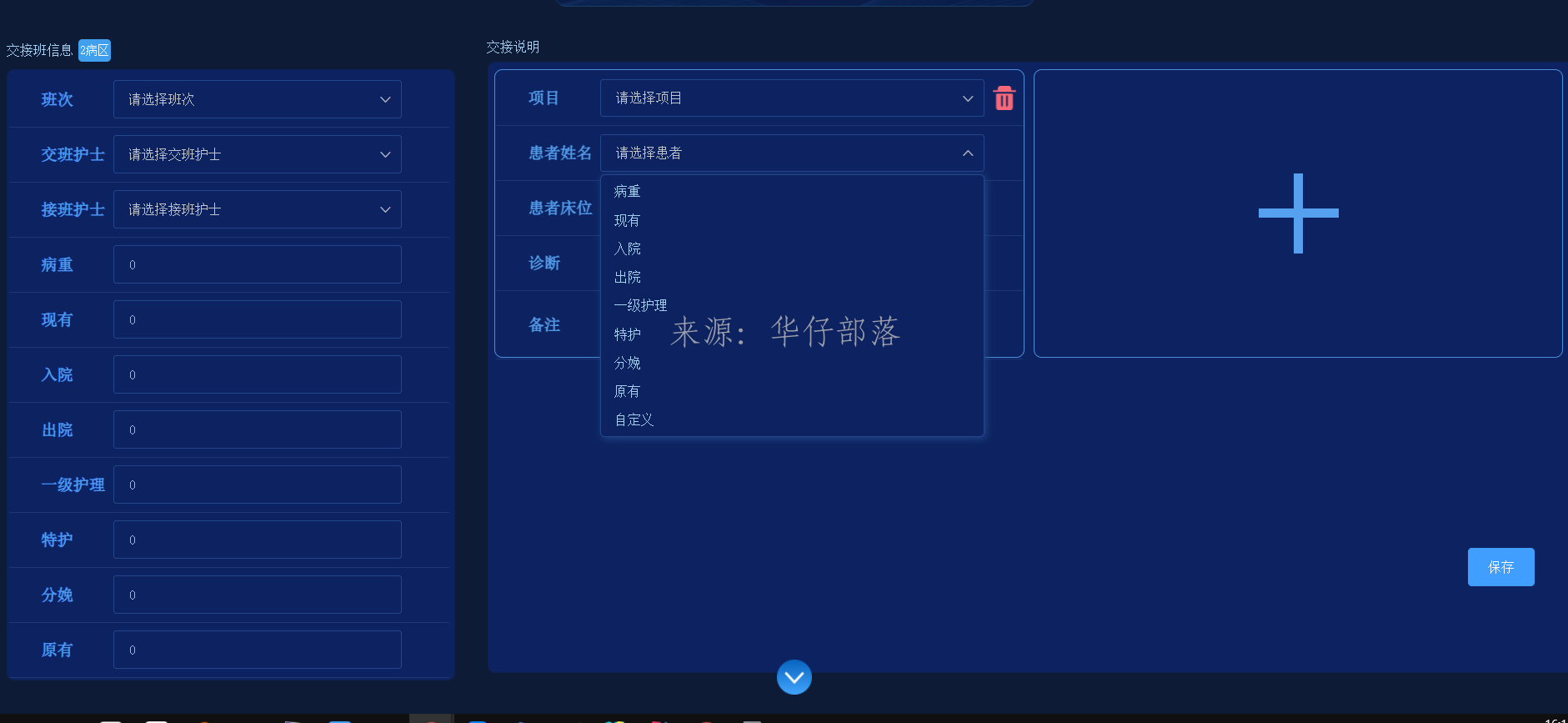
自定义下拉框组件
基于element-ui的el-input 和jquery,可做部分替换
组件代码:
<template>
  <div class="customSelectClass" @click.stop>
    <el-input :ref="refName" v-model="customLabel" readonly :class="refName" :placeholder="placeholder" @focus="inputFocus" />
    <span class="el-input__suffix">
      <span class="el-input__suffix-inner">
        <i class="el-select__caret el-input__icon el-icon-arrow-up" :class="{'is-reverse':!showDropDown}" />
      </span>
    </span>
    <div class="input-icon">
      <slot name="input-icon" />
    </div>
    <div v-show="showDropDown" :class="'dropDown-'+refName+'-scroll'" class="drop-down" :style="{'width':dropDownWidth,'height':dropDownHeight,'bottom':dropDownBottom,'top':dropDownTop}" @scroll="dropDownScrollFun">
      <div v-for="(item,index) in showContentArray" :key="index" class="drop-down-item" @click="itemClick(item)">
        <div class="contentDiv" :class="{'activeContent':index === selectIndex}">
          <div class="content" :class="['ellipsis-' + ellipsisNumber]" v-html="item[options.label]" />
          <div class="item-icon">
            <slot name="item-icon" :selectRow="{$index:index,data:item}" />
          </div>
        </div>
      </div>
    </div>
  </div>
</template>

<script>
import $ from 'jquery'
export default {
  name: 'CustomSelect',
  props: {
    // 输入框的值
    value: {
      type: String,
      default: ''
    },
    label: { // 键值
      type: String,
      default: ''
    },
    // 参数配置
    options: {
      type: Object,
      default() {
        return {
          'key': 'key', // 下拉框key对应的field
          'label': 'label',
          'value': 'value' // 下拉value对应的field
        }
      }
    },
    // 超出省略行数 0为不省略
    ellipsisNumber: {
      type: Number,
      default: 0
    },
    // 内容数组 item为{key:'',value:''}
    contentArray: {
      type: Array,
      default() {
        return []
      }
    },
    // 映射项ref名称
    refName: {
      type: String,
      default() {
        return this.UUIDRandomString(32)
      }
    },
    // 下拉列表最大高度
    dropDownMaxHeight: {
      type: String,
      default() {
        return '300px'
      }
    },
    // 下拉列表高度
    dropDownHeight: {
      type: String,
      default() {
        return 'auto'
      }
    },
    // 下拉列表宽度
    dropDownWidth: {
      type: String,
      default() {
        return '250px'
      }
    },
    // 输入提示
    placeholder: {
      type: String,
      default: '请选择'
    },
    // 在这个class名下就不隐藏
    noHideClass: {
      type: String,
      default: 'noHideClass'
    }
  },
  data() {
    return {
      showContentArray: [], // 显示的内容列表
      remoteContentArray: [], // 获取的远程数据数组
      customValue: '', // 自定义输入框的值
      customLabel: '', //
      curPage: 1, // 当前页数
      selectIndex: -1, // 选中下标
      dropDownBottom: 0,
      dropDownTop: 0,
      scrollBottomLoadDistance: 3, // 滚动到距离底部x距离时进行加载数据
      moreLoading: false, // 加载更多loading
      showDropDown: false // 下拉框显示标记
    }
  },
  watch: {
    // 监听value值变化
    value: {
      handler(val) {
        // 更新输入框的值
        this.customValue = val
      },
      immediate: true
    },
    // 监听下拉框的显示标记
    showDropDown(value) {
      // 当前为隐藏时 跳过
      if (!value) {
        return
      }
      this.$nextTick(() => {
        const brotherArray = this.$parent.$children || []
        // 循环隐藏非当前项的下拉框
        brotherArray.forEach(item => {
          item.showDropDown = !(item && item.refName !== this.refName)
        })
      })
    }
  },
  mounted() {
    this.$nextTick(() => {
      // 给document添加点击事件 点击空白处 关闭下拉框
      document.addEventListener('click', this.hideDropDown)
    })
  },
  destroyed() {
    // 给document移除点击事件
    document.removeEventListener('click', this.hideDropDown)
  },
  methods: {
    UUIDRandomString(length) {
      const uuid = '0123456789abcdefghijklmnopqrstuvwxyz'
      let text = ''
      for (let i = 0; i < length; i++) {
        text += uuid.charAt(Math.floor(Math.random() * uuid.length))
      }
      return text
    },
    // 下拉框滚动条监听
    dropDownScrollFun(val) {
      // 获取下拉框对象
      const scroll = document.querySelector('.dropDown-' + this.refName + '-scroll')
      /**
       * 处理div内部滚动条滚动到底部后导致 再次滚动时触发外部的滚动条
       * 处理方法为:
       * 当前内部滚动条滚动到距离底部小于等于2px时,将其滚动条位置 重置为距离底部2px
       * scrollTop: 可视区域顶部与滚动条顶部的距离
       * scrollHeight: 整个滚动条的高度
       * clientHeight: 可视区域的高度
        */
      // 当前滚动条距离底部还剩2px时
      if (scroll.scrollHeight - (scroll.scrollTop + scroll.clientHeight) <= 2) {
        // 定位到距离底部2px的位置
        scroll.scrollTop = (scroll.scrollHeight - scroll.clientHeight - 2)
      }
    },
    // 输入框聚焦
    inputFocus() {
      // 显示数据
      this.filterShowArray()
      // 获取输入框对象
      // eslint-disable-next-line no-undef
      const inputObj = $('.customSelectClass').find('.' + this.refName)
      if (inputObj && inputObj.length) {
        // 当前输入框底部距离页面顶部的高度
        const clientRectBottom = inputObj.parent()[0].getBoundingClientRect().bottom
        // 当前输入框的高度
        const inputHeight = inputObj.parent()[0].clientHeight
        // 当前下拉框本身的高度
        const dropDownHeightVal = Number(this.dropDownHeight.replace('px', ''))
        // 当前可视区域的高度
        const pageHeight = document.body.clientHeight
        // 下拉框显示部分超出了可视区域
        if ((clientRectBottom + dropDownHeightVal) > pageHeight) {
          // 向上偏移 下拉框本身高度 额外加2
          this.dropDownBottom = (inputHeight + 2) + 'px'
          this.dropDownTop = 'auto'
        } else {
          // 向下偏移 下拉框本身高度 额外加2
          this.dropDownBottom = 'auto'
          this.dropDownTop = (inputHeight + 2) + 'px'
        }
      }
    },
    // 隐藏下拉框方法
    hideDropDown() {
      // 如果点击的不是这个class或者这个class的子节点则隐藏
      if (!($(window.event.target).closest('.' + this.noHideClass).length)) {
        this.showDropDown = false
      }
    },
    // 过滤数据 回显
    filterShowArray() {
      // 设置到显示值数组中
      this.showContentArray = JSON.parse(JSON.stringify(this.contentArray))
      this.showDropDown = this.showContentArray.length > 0
    },
    // 选项点击
    itemClick(item) {
      // 赋值
      this.customValue = item[this.options.value]
      this.customLabel = item[this.options.label]
      // 更新外部值
      this.$emit('input', this.customValue)
      // 更新外部值
      this.$emit('update:label', this.customLabel)
      // 隐藏下拉框
      this.showDropDown = false
    }
  }
}
</script>

<style lang="scss" scoped>
  ::v-deep .el-icon-remove{
    color: #cfcfcf !important;
  }
  ::v-deep .el-input__suffix .el-select__caret.is-reverse {
    transform: rotate(180deg);
  }
.customSelectClass{
  position: relative;
  .input-icon{
    cursor: pointer;
    position: absolute;
    bottom: 0;
    right:0;
  }
  .drop-down{
    &::-webkit-scrollbar {
      width:4px
    }
    &::-webkit-scrollbar-thumb {
      background:transparent;
      border-radius:4px
    }
    &:hover::-webkit-scrollbar-thumb {
      background:hsla(0,0%,53%,.4)
    }
    &:hover::-webkit-scrollbar-track {
      background:hsla(0,0%,53%,.1)
    }
    width: 250px;
    height: 300px;
    overflow-y: scroll;
    background-color: #FFF;
    position: absolute;
    border: 2px solid #E0E4ED;
    box-shadow: 2px 2px 8px #d8d5d5;
    border-radius: 5px;
    left: 0;
    z-index: 999999;
  }
  .drop-down-item{
    .contentDiv{
      display: flex;
      align-items:center;
      padding-left: 0.5vw;
    }
    .contentDiv:hover{
      color: #1890ff;
      background-color: #f5f7fa;
      .item-icon{
        display: block;
      }
    }
    .item-icon{
      display: none;
      position: absolute;
      right: 0;
      transition: 0.3s;
    }
    .activeContent{
      color: #1890ff;
      background-color: #f5f7fa;
    }
    .content{
      text-align: left;
      cursor: pointer;
      padding: 5px 0 5px 5px;
    }
    ::v-deep .dividerClass{
      margin:2px 0 !important;
      background-color: #e2e2e2 !important;
    }
  }
}
</style>
使用案例
<custom-select
  :ref="`dropDownSickName`+item.id"
  v-model="item.sickName"
  :ref-name="`sickName`+item.id"
  placeholder="请选择患者"
  :drop-down-width="'24vw'"
  :drop-down-max-height="'18vw'"
  :options="{
    key:'itemId',
    label:'itemName',
    value:'itemId'
  }"
  :content-array="itemList"
/>

还没有评论,来说两句吧...